Delegation Framework Tutorial for Intuition (ERC-7710)
Build a production-ready Next.js Claim Feed app with gasless, delegated staking on Intuition using ERC-7710 delegation and MetaMask Hybrid Smart Accounts.
Welcome! In this tutorial, we're going to build a fully functional Claim Feed on the Intuition Protocol.
By the end, you'll have a production-ready Next.js application where users can connect their MetaMask wallet, browse a live feed of claims, and support or oppose them - all without a single MetaMask popup per action.
This tutorial is split into six checkpoints. Each one ends with a real npm run dev preview — something you can actually click through in the browser — building on the last, so you're never pasting code that references a file you haven't created yet.
Prerequisites
Before we dive in, make sure you have:
- Node.js 18+
- MetaMask browser extension installed
- A secondary "Admin" wallet - You need the private key of a throwaway wallet that will pay gas on behalf of your users. Never use your main wallet for this.
- Basic React/TypeScript knowledge - Comfortable with hooks, state, and components
What We're Building
Here is exactly what our Claim Feed will do by the end of this tutorial:
Frontend Features
- Intuition Network Connection - Connect MetaMask and automatically switch to the Intuition Mainnet
- Delegated Staking Setup Panel - Let users deploy a Hybrid Smart Account and sign a scoped delegation in one flow
- Daily Allowance Meter - A live display of how much of today's delegated spend cap is left and when it resets, plus the HSA balance and a block-explorer link
- Infinite Scroll Feed - A live, paginated feed of all claims on the protocol. Each card is a toggle: Support / Oppose to open a position, click the same side again to withdraw it, or click the other side to switch (withdraw, then re-stake)
- Delegated Activity Log - A bottom-docked, expandable panel that records every delegated
deposit/redeemthe relayer submitted, with the raw call and a link to the transaction - Delegation Revocation - Let users revoke their delegated staking permissions at any time
Backend Features
- Gas Relayer API - A secure Next.js API route that holds our Admin wallet's private key and submits delegated deposits and withdrawals on behalf of users
How This Will Work
In standard Web3 applications, every single on-chain action requires the user to manually confirm a MetaMask popup and pay gas fees. For high-frequency social protocols like Intuition, where users constantly interact with knowledge graphs by creating claims, supporting statements, or opposing triples, this constant friction causes severe user drop-off. Delegated execution solves this UX bottleneck by allowing users to delegate specific, restricted permissions to an automated agent or backend relayer.
To understand how this architecture operates, it is helpful to explore the core protocol building blocks that make seamless delegated execution possible.
Core Concepts
-
Externally Owned Account (EOA): The foundational layer of user identity. This is the standard wallet address managed directly by browser extensions like MetaMask. In traditional web3 applications, an EOA must sign every individual transaction directly on-chain, limiting automation and forcing users to approve every gas fee manually.
-
Hybrid Smart Account (HSA): A smart account the user's wallet fully owns and controls, deployed at its own deterministic address (derived from the wallet address + a salt). It's the delegator — the account that signs delegations. We use a Hybrid smart account rather than an ERC-7702 upgrade of the EOA itself because real caveats (pinning
receiver, gating specific selectors) need a delegator the dapp controls; ERC-7702 + ERC-7715 — the sanctioned path for a wallet-upgraded account — can't constrain arbitrary call arguments. So the HSA lives at its own address, and the user's key signs on its behalf. -
ERC-7710 (Delegation Framework): A standardized protocol for creating, signing, and redeeming execution authority off-chain. Instead of giving a third party full access to a wallet, ERC-7710 allows the user to sign an off-chain EIP-712 payload that grants another address, known as the delegatee, permission to execute specific actions on their behalf.
-
Caveat Enforcers: Smart contracts that enforce strict cryptographic constraints on the delegated payload. In the context of Intuition, caveats ensure that the delegatee can only call the MultiVault contract, can only execute
depositandredeem, can only spend up to a per-day TRUST cap that refills automatically, always credits the user's own address, and can only execute a limited number of calls before the session key expires. -
Backend Relayer: A secure application server holding an Admin Wallet private key. When a user acts on the claim feed, the frontend forwards the signed delegation payload to the relayer. The relayer then broadcasts the transaction to the blockchain, paying the gas fees so the user experiences zero transaction popups. It only submits the call — the funds moved are the HSA's, and everything is credited back to the user.
-
DelegationManager Contract: The central verification engine on Intuition. It receives the delegation payload from the relayer, verifies the user's signature, passes the transaction parameters through every attached Caveat Enforcer, and only forwards the call to the destination contract if every rule condition passes.
-
Intuition MultiVault Contract: The core smart contract protocol that manages Atoms, Triples, and bonding curve vaults on Intuition. When the DelegationManager validates a delegated execution, it calls
deposit(orredeem) on the MultiVault, crediting the resulting shares — or the withdrawn TRUST — directly to the user's address.
To see how these concepts connect during setup and execution, let's explore the delegation flow and the user flow.
Delegation Flow
Here is how delegation permissions are derived, funded, signed, and stored:
-
HSA Address Derivation: The application derives the user's Hybrid Smart Account address deterministically from their connected wallet address (+ a fixed salt). It is a separate address the user's wallet owns — not the wallet's own address.
-
HSA Funding: The user transfers TRUST from their wallet into their HSA address (for example, 5 TRUST). Every delegated Support / Oppose is a deposit drawn from this balance; the per-day cap below controls how fast it can be spent. (Gas is paid separately, by the relayer.)
-
User Signs Delegation: The user signs an off-chain EIP-712 delegation message where:
- from: The user's HSA address
- to: Our Admin Wallet address (
ADMIN_DELEGATEE) - caveats: Restricted to calling
deposit()andredeem()on the Intuition MultiVault, with the receiver pinned to the user's own address, up to a user-defined TRUST cap per rolling 24h window that resets automatically. (Withdrawals movevalue = 0, so they don't touch the cap.)
-
Off-Chain Storage: The signed delegation payload is saved in local storage without incurring any transaction gas fees for the user.
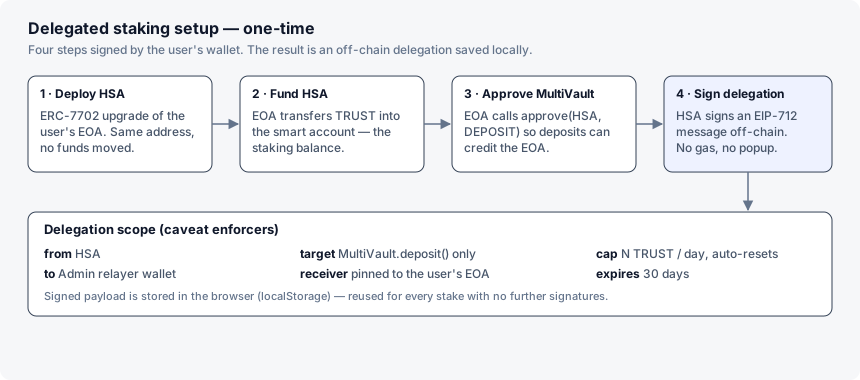
User Flow
Once delegation is configured, here is how user interactions, relayer dispatch, and on-chain settlement execute seamlessly:
-
User Interaction: The user clicks Support, Oppose, or their current side (to withdraw) on the claim feed, with zero MetaMask popups. Switching sides is two ops — a withdraw, then a deposit.
-
Relayer Dispatch: For each op, the frontend forwards the saved delegation payload plus an
action(depositorredeem) to our backend/api/stakeroute. -
Admin Wallet Execution: Our backend uses our Admin Wallet private key to submit
DelegationManager.redeemDelegations()on-chain, covering the transaction gas fee on behalf of the user. -
Caveat Verification and Settlement: The DelegationManager contract verifies the user's cryptographic signature, enforces all attached caveats, and executes the
depositorredeemon the MultiVault contract, crediting shares (or the withdrawn TRUST) directly to the user's account.
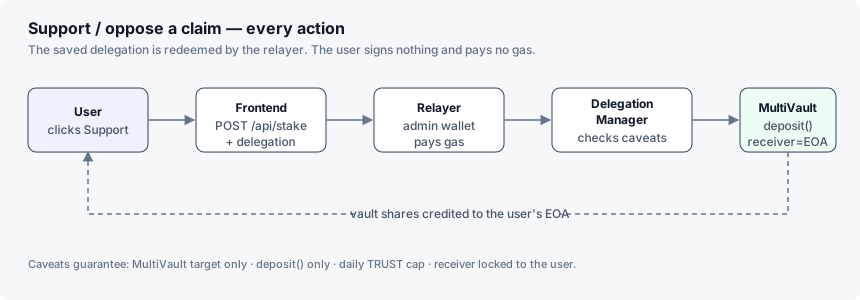
Project Setup
Let's initialize our Next.js project and install everything we need.
npx create-next-app@latest intuition-claim-feed
cd intuition-claim-feed
npm install viem @metamask/smart-accounts-kit @tanstack/react-query
Environment Variables
Create a .env.local file in the root of your project:
# The private key of your backend Admin Wallet
# This wallet pays gas for delegated stakes. Use a throwaway wallet.
ADMIN_PRIVATE_KEY=0xYourAdminWalletPrivateKeyHere

# The public address derived from the key above. The frontend needs this to
# know who it's delegating to — if it doesn't match ADMIN_PRIVATE_KEY, the
# relayer won't be able to redeem the delegations you create.
NEXT_PUBLIC_ADMIN_ADDRESS=0xYourAdminWalletAddressHere
Security Note: The
ADMIN_PRIVATE_KEYmust never be exposed to the frontend. We will only access it inside Next.js API routes which run exclusively on the server.
Centralized Constants
Create src/lib/constants.ts. Keeping all contract addresses in one place means we only have to update them once if they ever change.
// src/lib/constants.ts
import { type Address } from 'viem';

// The Intuition Protocol MultiVault on Mainnet
export const MULTIVAULT: Address = '0x6E35cF57A41fA15eA0EaE9C33e751b01A784Fe7e';

// The MetaMask Delegation Manager on Intuition Mainnet
export const DELEGATION_MANAGER: Address = '0xdb9B1e94B5b69Df7e401DDbedE43491141047dB3';

// The two MultiVault calls the relayer is allowed to make. Both take the
// receiver as their first argument, so one calldata offset pins it for either.
export const DEPOSIT_SIG = 'deposit(address,bytes32,uint256,uint256)';
export const REDEEM_SIG = 'redeem(address,bytes32,uint256,uint256,uint256)';

// Byte offset of the `receiver` argument inside the calldata (right after the
// 4-byte selector). Both deposit() and redeem() take it first, so one pin works.
export const DEPOSIT_OFFSET = { receiver: 4 } as const;

// MultiVault approval flags (bitfield: DEPOSIT = 0b01, REDEMPTION = 0b10, BOTH = 0b11).
// DEPOSIT lets the HSA open/add to positions crediting the EOA; REDEMPTION lets it
// close the EOA's positions (proceeds still go to the EOA). This app's feed can
// both stake and unstake (and switch sides), so it grants BOTH.
export const ApprovalType = { NONE: 0, DEPOSIT: 1, REDEMPTION: 2, BOTH: 3 } as const;

// The rolling window the delegated staking cap is measured over. The
// NativeTokenPeriodTransfer caveat lets the relayer spend up to the chosen
// amount per window, then refills automatically on the next one.
export const BUDGET_PERIOD_SECONDS = 86_400; // 1 day

// Intuition's block.timestamp can trail wall-clock time by a couple of
// minutes. Backdate the period's startDate by this much so the first
// delegated deposit doesn't revert with
// `NativeTokenPeriodTransferEnforcer:transfer-not-started`.
export const BUDGET_START_BACKDATE_SECONDS = 3_600; // 1 hour

// The minimal MultiVault ABI this app needs: write calls (deposit, redeem,
// approve) and read helpers (previewDeposit, previewRedeem, getShares).
export const multiVaultAbi = [
  {
    type: 'function',
    name: 'deposit',
    stateMutability: 'payable',
    inputs: [
      { name: 'receiver', type: 'address' },
      { name: 'termId', type: 'bytes32' },
      { name: 'curveId', type: 'uint256' },
      { name: 'minShares', type: 'uint256' },
    ],
    outputs: [{ type: 'uint256' }],
  },
  {
    type: 'function',
    name: 'approve',
    stateMutability: 'nonpayable',
    inputs: [
      { name: 'sender', type: 'address' },
      { name: 'approvalType', type: 'uint8' },
    ],
    outputs: [],
  },
  {
    type: 'function',
    name: 'previewDeposit',
    stateMutability: 'view',
    inputs: [
      { name: 'termId', type: 'bytes32' },
      { name: 'curveId', type: 'uint256' },
      { name: 'assets', type: 'uint256' },
    ],
    outputs: [
      { name: 'shares', type: 'uint256' },
      { name: 'assetsAfterFees', type: 'uint256' },
    ],
  },
  {
    type: 'function',
    name: 'redeem',
    stateMutability: 'nonpayable',
    inputs: [
      { name: 'receiver', type: 'address' },
      { name: 'termId', type: 'bytes32' },
      { name: 'curveId', type: 'uint256' },
      { name: 'shares', type: 'uint256' },
      { name: 'minAssets', type: 'uint256' },
    ],
    outputs: [{ type: 'uint256' }],
  },
  {
    type: 'function',
    name: 'previewRedeem',
    stateMutability: 'view',
    inputs: [
      { name: 'termId', type: 'bytes32' },
      { name: 'curveId', type: 'uint256' },
      { name: 'shares', type: 'uint256' },
    ],
    outputs: [
      { name: 'assetsAfterFees', type: 'uint256' },
      { name: 'sharesUsed', type: 'uint256' },
    ],
  },
  {
    type: 'function',
    name: 'getShares',
    stateMutability: 'view',
    inputs: [
      { name: 'account', type: 'address' },
      { name: 'termId', type: 'bytes32' },
      { name: 'curveId', type: 'uint256' },
    ],
    outputs: [{ type: 'uint256' }],
  },
] as const;
Checkpoint 1: Wallet Connection
Before we can do anything onchain, we need to connect to the user's MetaMask wallet and make sure they are on the correct network. This checkpoint ends with a page that actually runs — nothing fancy yet, just a header and a working Connect button.
1. Define the Chain
Create src/lib/chains.ts. This tells viem everything it needs to know about the Intuition network.
// src/lib/chains.ts
import { defineChain } from 'viem';

export const intuitionMainnet = defineChain({
  id: 1155,
  name: 'Intuition',
  nativeCurrency: { decimals: 18, name: 'Intuition', symbol: 'TRUST' },
  rpcUrls: {
    default: { http: ['https://rpc.intuition.systems/http'] },
  },
  blockExplorers: {
    default: { name: 'Blockscout', url: 'https://explorer.intuition.systems' },
  },
});
2. The Wallet Context
Create src/lib/WalletContext.tsx. This context does three important things:
- It provides a
viemWalletClient(for sending transactions) andPublicClient(for reading from the chain) to every component in the app. - It handles the MetaMask connection flow via
window.ethereum. - It includes an
ensureChainhelper that switches the user to the Intuition network before any transaction, so we never get wrong-network reverts.
View src/lib/WalletContext.tsx
// src/lib/WalletContext.tsx
'use client';

import { createContext, useContext, useState, useEffect, ReactNode } from 'react';
import { createWalletClient, custom, createPublicClient, http, WalletClient, PublicClient, Address, EIP1193Provider } from 'viem';
import { intuitionMainnet } from './chains';

// Augment Window with viem's own EIP-1193 provider type, so `window.ethereum`
// is usable everywhere below without an `any` cast.
declare global {
  interface Window {
    ethereum?: EIP1193Provider;
  }
}

interface WalletContextType {
  address: Address | null;
  walletClient: WalletClient | null;
  publicClient: PublicClient;
  connect: () => Promise<void>;
  disconnect: () => void;
  ensureChain: () => Promise<void>;
}

// We create one shared PublicClient for the whole app.
// This is used for read-only operations like fetching balances or simulating transactions.
const publicClient = createPublicClient({
  chain: intuitionMainnet,
  transport: http(),
}) as PublicClient;

const WalletContext = createContext<WalletContextType | null>(null);

// viem wraps the raw provider error, so the 4902 code can land on the error
// itself or one level down in `.cause` - this reads it out without `any`.
function getErrorCode(err: unknown): number | undefined {
  if (typeof err !== 'object' || err === null) return undefined;
  const code = (err as { code?: unknown }).code;
  if (typeof code === 'number') return code;
  const cause = (err as { cause?: unknown }).cause;
  if (typeof cause === 'object' && cause !== null) {
    const causeCode = (cause as { code?: unknown }).code;
    if (typeof causeCode === 'number') return causeCode;
  }
  return undefined;
}

// This helper switches the user to Intuition Mainnet.
// If the chain hasn't been added to MetaMask yet (error 4902), it adds it first.
async function switchToIntuition(client: WalletClient) {
  try {
    await client.switchChain({ id: intuitionMainnet.id });
  } catch (err) {
    const code = getErrorCode(err);
    const message = err instanceof Error ? err.message : '';
    if (code === 4902 || /Unrecognized chain/i.test(message)) {
      await client.addChain({ chain: intuitionMainnet });
      await client.switchChain({ id: intuitionMainnet.id });
    } else {
      throw err;
    }
  }
}

export function WalletProvider({ children }: { children: ReactNode }) {
  const [address, setAddress] = useState<Address | null>(null);
  const [walletClient, setWalletClient] = useState<WalletClient | null>(null);

  const connect = async () => {
    if (typeof window === 'undefined' || !window.ethereum) {
      alert('Please install MetaMask!');
      return;
    }
    const ethereum = window.ethereum;
    try {
      const client = createWalletClient({
        chain: intuitionMainnet,
        transport: custom(ethereum),
      });
      const [addr] = await client.requestAddresses();

      // We create a new client bound to the user's address.
      // This prevents "Could not find an Account" errors in viem when signing.
      const boundClient = createWalletClient({
        account: addr,
        chain: intuitionMainnet,
        transport: custom(ethereum),
      });

      await switchToIntuition(client);
      setAddress(addr);
      setWalletClient(boundClient as WalletClient);
    } catch (e) {
      console.error(e);
    }
  };

  // Checks the chain right before any transaction - in case the user switched networks manually
  const ensureChain = async () => {
    if (!walletClient) throw new Error('Wallet not connected');
    await switchToIntuition(walletClient);
  };

  const disconnect = () => {
    setAddress(null);
    setWalletClient(null);
  };

  // Keep the app in sync if the user changes accounts in MetaMask
  useEffect(() => {
    if (typeof window === 'undefined' || !window.ethereum) return;
    const ethereum = window.ethereum;
    const handleAccountsChanged = (accounts: Address[]) => {
      if (accounts.length > 0) setAddress(accounts[0]);
      else disconnect();
    };
    ethereum.on('accountsChanged', handleAccountsChanged);
    return () => ethereum.removeListener('accountsChanged', handleAccountsChanged);
  }, []);

  return (
    <WalletContext.Provider value={{ address, walletClient, publicClient, connect, disconnect, ensureChain }}>
      {children}
    </WalletContext.Provider>
  );
}

export const useWallet = () => {
  const context = useContext(WalletContext);
  if (!context) throw new Error('useWallet must be used within WalletProvider');
  return context;
};
3. Wrap the App in the Providers
The wallet context needs to be available everywhere, and the claim feed (built later) uses @tanstack/react-query, which needs a QueryClientProvider. Put both in one client component, src/lib/providers.tsx:
// src/lib/providers.tsx
'use client';

import { useState } from 'react';
import { QueryClient, QueryClientProvider } from '@tanstack/react-query';
import { WalletProvider } from './WalletContext';

export function Providers({ children }: { children: React.ReactNode }) {
  const [queryClient] = useState(() => new QueryClient());

  return (
    <QueryClientProvider client={queryClient}>
      <WalletProvider>{children}</WalletProvider>
    </QueryClientProvider>
  );
}
(The repo also wraps a WagmiProvider here for other tooling; nothing in this tutorial's flow depends on it, so it's omitted for clarity.)
Then wrap the app in src/app/layout.tsx:
// src/app/layout.tsx
import './globals.css';
import { Providers } from '@/lib/providers';

export default function RootLayout({ children }: { children: React.ReactNode }) {
  return (
    <html lang="en">
      <body className="bg-black text-white min-h-screen font-mono">
        <Providers>{children}</Providers>
      </body>
    </html>
  );
}
4. The Connect Button
Create src/components/ConnectButton.tsx. This is a simple component that shows a truncated wallet address when connected, or a Connect button when not.
// src/components/ConnectButton.tsx
'use client';
import { useWallet } from '@/lib/WalletContext';

export function ConnectButton() {
  const { address, connect, disconnect } = useWallet();

  if (address) {
    return (
      <button
        onClick={disconnect}
        className="px-4 py-2 border border-white/20 text-white/70 font-mono text-sm hover:border-white hover:text-white transition-all"
      >
        {address.slice(0, 6)}...{address.slice(-4)}
      </button>
    );
  }

  return (
    <button
      onClick={connect}
      className="px-4 py-2 bg-white text-black font-bold uppercase tracking-widest text-sm hover:bg-white/90 transition-all"
    >
      Connect Wallet
    </button>
  );
}
5. Wire It Up
Everything above exists, but nothing renders it yet. Create src/app/page.tsx:
// src/app/page.tsx
import { ConnectButton } from '@/components/ConnectButton';

export default function Home() {
  return (
    <main className="min-h-screen bg-[#0a0a0a] text-white py-16 px-4 sm:px-6 lg:px-8 selection:bg-white selection:text-black font-sans">
      <div className="max-w-3xl mx-auto">
        <header className="flex justify-between items-start mb-16 border-b border-white/10 pb-8">
          <div>
            <h1 className="text-4xl font-black tracking-tighter text-white uppercase">
              Intuition<br/><span className="text-white/50">Claim Feed</span>
            </h1>
            <p className="text-white/60 mt-4 text-sm uppercase tracking-widest font-semibold">Browse claims. Support truth. Oppose falsehood.</p>
          </div>
          <ConnectButton />
        </header>
      </div>
    </main>
  );
}
Checkpoint — run it.
npm run dev, openhttp://localhost:3000. You should see the Claim Feed header and a Connect button; clicking it opens MetaMask and, once connected, shows your truncated address switched to Intuition Mainnet. Nothing else exists yet — that's the rest of this tutorial, built on top of this exact file.
Checkpoint 2: The Delegated Staking Wizard
This is the core of the tutorial. We will build both the delegation logic and the UI that drives it.
Rather than one big "Enable" button that fires four wallet prompts in a row, we walk the user through the setup one step at a time — each step is its own action with its own explainer, and the wizard only advances once the previous step confirms. The four steps are:
- Deploy the HSA - Calculate the user's deterministic Hybrid Smart Account address (a separate address the user's wallet owns) and, if it isn't deployed on-chain yet, deploy it. No funds moved here. One-time.
- Fund the HSA - Transfer TRUST from the user's main wallet to the HSA. This is the staking balance every delegated deposit is drawn from; the per-day cap in the delegation limits how fast it can be drawn down. The user can top up the HSA address anytime to extend the runway. (Gas is paid by the relayer, separately.)
- Approve the MultiVault - The user's EOA calls
multiVault.approve(HSA, ApprovalType.BOTH). This authorizes the HSA to submitdepositandredeemcalls (withreceiver = EOA) into Atom and Triple vaults, so shares — and any withdrawn TRUST — are credited to the user's own address. The MultiVault rejectsdeposit/redeemwherereceiver != senderwithout this approval - it never moves the HSA's funds itself; the HSA sends the call and the MultiVault just allows the EOA as the beneficiary. - Sign the delegation - Build the scoped delegation (
from: HSA,to: relayer, plus caveats: deposit + redeem selectors, receiver pinned to the user, the per-day cap, an expiry) and ask the user for one off-chain signature. Because the user's key owns the HSA, that signature is the HSA granting the permission. Save it tolocalStorageso the feed reuses it for every future op with no more prompts. (See What is the user actually signing in step 4? below - it's the subtlest part of the flow.)
We track how far the user has got with a small { deployed, funded, approved } record in localStorage, plus an on-chain isDeployed() check so a returning user resumes at the right step. Step 4 is "done" once a signed delegation exists.
We'll build the hook that implements all four steps first, then the UI that drives it — so by the time the component needs useAdminDelegation, it already exists.
The Delegation Hook
Create src/hooks/useAdminDelegation.ts. This is where all the logic lives. It exposes the four step actions (deployHsa, fundHsa, approveMultiVault, signDelegation), a wizard progress record, a busyStep marker for the spinner, plus everything the active-state UI needs. Each action sets busyStep, runs its one on-chain (or, for step 4, off-chain) operation, and flips its wizard flag on success — so the component always renders the first unfinished step.
What does approving the MultiVault actually do?
approveMultiVault has the user's EOA call multiVault.approve(HSA, ApprovalType.BOTH). This is easy to misread as "letting the MultiVault move the HSA's money" - it is the opposite. The MultiVault tracks share ownership per address, and by default it only lets an address open, add to, or redeem an Atom/Triple position for itself (receiver == msg.sender). When the relayer redeems the delegation, the HSA is the account calling deposit(...) / redeem(...), but we pin the receiver argument to the user's EOA so shares — and any withdrawn TRUST — land in the user's own wallet, never the HSA. That cross-address access is exactly what the approval unlocks. (See the approve function - it just writes approvals[receiver][sender].) Revoking flips it back to ApprovalType.NONE.
DEPOSIT vs REDEMPTION vs BOTH
The approval is a bitfield: DEPOSIT (0b01) gates deposit(), REDEMPTION (0b10) gates redeem(), and BOTH (0b11) is both. This app's feed lets a user open a position, withdraw it, or switch sides (withdraw + re-stake), so the relayer needs both calls - hence BOTH, paired with an AllowedMethods caveat that permits only the deposit and redeem selectors. A stake-only relayer would grant DEPOSIT alone; that's the right default when you don't need the exit path. Redemption is still safe to delegate: redeem() always sends the withdrawn TRUST to the receiver (the user), never to whoever submitted the call - so a redemption-approved agent can convert your shares back to TRUST in your own wallet, but can't route them anywhere else.
What is the user actually signing in step 4? (the subtle one)
This is the part most people trip on, so it's worth being explicit. Three separate addresses are in play:
- The EOA - the user's plain wallet, controlled by their MetaMask private key.
- The HSA - the Hybrid Smart Account from step 1. It's at its own address (deterministically derived from the EOA), and the EOA is its owner - so the EOA's key can act on the HSA's behalf.
- The relayer - our Admin Wallet (
ADMIN_DELEGATEE), a completely separate address.
createDelegation({ from: HSA, to: ADMIN_DELEGATEE, scope, caveats }) builds a permission object that says "the HSA authorizes the relayer to execute these specific calls." The user signs it with MetaMask - and because their key owns the HSA, that signature counts as the HSA granting the permission. No transaction, no gas; the signed blob just goes to localStorage.
Later, for every click, the relayer calls DelegationManager.redeemDelegations(thisDelegation, [oneExecution]). The DelegationManager verifies the HSA's signature, runs the execution's target / value / calldata through every caveat (AllowedTargets = MultiVault, AllowedMethods = deposit/redeem, AllowedCalldata = receiver is the EOA, NativeTokenPeriodTransfer = under the daily cap, Timestamp = not expired), and only then forwards the call as the HSA. So the MultiVault sees msg.sender == HSA spending the HSA's balance, with receiver == EOA - which is why step 3's approve(HSA, BOTH) was needed, and why the caveat pins the receiver.
Net: the user signs once, the relayer can act many times, but only ever deposit/redeem on the MultiVault, only crediting the user, only within the cap, only for 30 days.
Why four separate steps instead of one button?
Setup is a deploy transaction, a transfer, an approval transaction, and a signature - four wallet interactions. Firing them back-to-back from a single click means four MetaMask pop-ups stacked on top of each other with no context for what the user is signing. Splitting them lets each step carry its own one-line explainer and only appear once the previous one has confirmed on-chain. Progress is a { deployed, funded, approved } record in localStorage, reconciled on load with an isDeployed() check so a half-finished setup resumes at the right step; step 4 is "done" once a signed delegation exists. revokeDelegation clears the record but re-marks deployed (the HSA contract stays deployed forever), so re-enabling restarts at fund.
Why a daily cap instead of a lifetime budget?
The first version of this hook used a NativeTokenTransferAmount scope - one fixed allowance spent over the delegation's whole life. Once it ran out, the user had to sign a brand new delegation. Swapping it for NativeTokenPeriodTransfer gives the relayer a fresh allowance every BUDGET_PERIOD_SECONDS (24h here). The NativeTokenPeriodTransferEnforcer tracks how much has been spent in the current window on-chain and refuses anything over periodAmount; when the window rolls over it resets automatically, no re-signing. We read the live remaining amount with getNativeTokenPeriodTransferEnforcerAvailableAmount (it reverts until the first redemption, so we fall back to the full cap), and compute the reset time from the periodStart we stored at setup.
One gotcha: the enforcer refuses any transfer where block.timestamp < startDate (transfer-not-started). Intuition's chain clock can trail wall-clock time by a couple of minutes, so if you set startDate to "now" the first stake reverts until the chain catches up. We set it to now - BUDGET_START_BACKDATE_SECONDS (an hour earlier); the only cost is that the very first window is ~1h shorter.
The period cap only counts native value out. A deposit sends msg.value, so it spends from the cap; a redeem moves value = 0 (the MultiVault pays the user), so withdrawals are free against the cap. That means a user can always withdraw or switch sides even if they've hit their daily deposit limit — the deposit half of a switch is what would be blocked.
Why do we use toFunctionSelector?
When we attach the AllowedMethods caveat, the blockchain requires the exact 4-byte EVM function selector - not a human-readable string. We pass both toFunctionSelector(DEPOSIT_SIG) and toFunctionSelector(REDEEM_SIG). If you pass a raw string instead, the Delegation Manager will silently reject the execution.
Why does revoke also sweep the HSA's balance?
Revoking only needs to flip the MultiVault approval to NONE -- but that leaves behind whatever unspent TRUST is still sitting in the HSA, with no easy way to get it back. The HSA's own execute() function only accepts calls from the ERC-4337 EntryPoint or the contract itself, so the owner's EOA can't just call it directly to move funds out; the "normal" way would be submitting a UserOperation through a bundler, which this app doesn't have wired up.
Instead, we reuse the exact same mechanism the relayer already uses for staking: the owner signs a one-time delegation from the HSA to themselves, scoped to the full remaining balance, and immediately redeems it with their own wallet (paying their own gas, since this is a rare, user-initiated action). No bundler, no new infrastructure -- just createDelegation + signDelegation + DelegationManager.redeemDelegations(), the same three calls used everywhere else in this hook.
View src/hooks/useAdminDelegation.ts
// src/hooks/useAdminDelegation.ts
import { useState, useEffect, useCallback } from 'react';
import { useWallet } from '@/lib/WalletContext';
import {
  Implementation,
  toMetaMaskSmartAccount,
  createDelegation,
  createExecution,
  ExecutionMode,
  ScopeType,
  CaveatType,
  MetaMaskSmartAccount
} from '@metamask/smart-accounts-kit';
import { DelegationManager } from '@metamask/smart-accounts-kit/contracts';
import { getNativeTokenPeriodTransferEnforcerAvailableAmount } from '@metamask/smart-accounts-kit/actions';
import { encodeAbiParameters, encodeFunctionData, parseEther, type Address, createWalletClient, custom, toFunctionSelector } from 'viem';
import { MULTIVAULT, DELEGATION_MANAGER, DEPOSIT_SIG, REDEEM_SIG, DEPOSIT_OFFSET, multiVaultAbi, ApprovalType, BUDGET_PERIOD_SECONDS, BUDGET_START_BACKDATE_SECONDS } from '@/lib/constants';
import { intuitionMainnet } from '@/lib/chains';

// The address derived from ADMIN_PRIVATE_KEY. Must be overridden via
// NEXT_PUBLIC_ADMIN_ADDRESS if you use your own admin wallet, or delegations
// will be signed for a relayer that can't redeem them.
export const ADMIN_DELEGATEE: Address =
  (process.env.NEXT_PUBLIC_ADMIN_ADDRESS as Address) || '0x9c103d804bc1867F429a37707Dc5d5C9b29D7a6C';
const getStorageKey = (addr: string) => `intuition_admin_delegation_${addr.toLowerCase()}`;
const getBudgetStorageKey = (addr: string) => `intuition_admin_budget_${addr.toLowerCase()}`;
const getWizardKey = (addr: string) => `intuition_admin_wizard_${addr.toLowerCase()}`;

// Per-address budget metadata saved alongside the delegation. `dailyCap` is the
// TRUST the relayer may spend per window; `periodStart` is the unix second the
// first window opened, used to show when the allowance next resets.
type BudgetMeta = { dailyCap: string; periodStart: number };

// The four one-time setup steps. The user runs them one at a time.
export type WizardStepKey = 'deploy' | 'fund' | 'approve' | 'sign';
export type WizardProgress = { deployed: boolean; funded: boolean; approved: boolean };

export const SETUP_STEPS: {
  key: WizardStepKey;
  title: string;
  action: string;
  detail: string;
  docUrl?: string;
  docLabel?: string;
}[] = [
  {
    key: 'deploy',
    title: 'Deploy Smart Account',
    action: 'Deploy',
    detail:
      'Deploy your Hybrid Smart Account (HSA) — a smart account your wallet owns and fully controls, at its own deterministic address (derived from your wallet). It is the account that signs the delegation in step 4. One-time; no funds moved here.',
    docUrl: 'https://docs.metamask.io/smart-accounts-kit/concepts/smart-accounts/',
    docLabel: 'Smart accounts ↗',
  },
  {
    key: 'fund',
    title: 'Fund the Smart Account',
    action: 'Fund',
    detail:
      'Move TRUST from your wallet into your smart account (HSA). Every Support / Oppose is a deposit drawn from this balance; the daily cap sets how fast it can be spent.',
  },
  {
    key: 'approve',
    title: 'Approve the MultiVault',
    action: 'Approve',
    detail:
      'One approval on the Intuition MultiVault. approve(HSA, BOTH) lets your smart account deposit into and redeem from Atom and Triple vaults on your behalf — shares and any withdrawn TRUST always go to your wallet, never the HSA. Without it the MultiVault only lets an address act for itself.',
    docUrl:
      'https://github.com/0xIntuition/intuition-contracts-v2/blob/94bddae0869f8fbf1cfb4a137aeb78b7fe302fcb/src/protocol/MultiVault.sol#L373',
    docLabel: 'MultiVault.approve() ↗',
  },
  {
    key: 'sign',
    title: 'Sign the delegation',
    action: 'Sign delegation',
    detail:
      'You sign with your wallet — the same key that owns the smart account, so this is the HSA authorizing it. The delegation is a scoped permission from your HSA to our relayer: it may only call deposit / redeem on the MultiVault, always with you as the receiver, up to your daily TRUST cap, expiring in 30 days. Off-chain, no gas — we store it and reuse it for every click.',
    docUrl: 'https://eips.ethereum.org/EIPS/eip-7710',
    docLabel: 'ERC-7710 ↗',
  },
];

const EMPTY_WIZARD: WizardProgress = { deployed: false, funded: false, approved: false };

function parseBudgetMeta(raw: string | null): BudgetMeta | null {
  if (!raw) return null;
  try {
    const parsed = JSON.parse(raw);
    if (parsed && typeof parsed === 'object' && 'dailyCap' in parsed) {
      return { dailyCap: String(parsed.dailyCap), periodStart: Number(parsed.periodStart) || 0 };
    }
    // Legacy value: a bare budget string with no window info.
    return { dailyCap: String(parsed), periodStart: 0 };
  } catch {
    return { dailyCap: raw, periodStart: 0 };
  }
}

function parseWizard(raw: string | null): WizardProgress {
  if (!raw) return EMPTY_WIZARD;
  try {
    const p = JSON.parse(raw);
    return { deployed: !!p?.deployed, funded: !!p?.funded, approved: !!p?.approved };
  } catch {
    return EMPTY_WIZARD;
  }
}

function errMessage(e: unknown): string {
  const err = e as { shortMessage?: string; message?: string };
  return err.shortMessage ?? err.message ?? 'Something went wrong';
}

export function useAdminDelegation() {
  const { walletClient, publicClient, address, ensureChain } = useWallet();
  const [smartAccount, setSmartAccount] = useState<MetaMaskSmartAccount | null>(null);
  const [busyStep, setBusyStep] = useState<WizardStepKey | 'revoke' | null>(null);
  const [delegation, setDelegation] = useState<Record<string, unknown> | null>(null);
  const [error, setError] = useState<string | null>(null);
  const [hsaBalance, setHsaBalance] = useState<bigint | null>(null);
  const [budgetMeta, setBudgetMeta] = useState<BudgetMeta | null>(null);
  const [periodAvailable, setPeriodAvailable] = useState<bigint | null>(null);
  const [periodResetsAt, setPeriodResetsAt] = useState<number | null>(null);
  const [wizard, setWizard] = useState<WizardProgress>(EMPTY_WIZARD);

  // Merge a patch into the wizard progress and persist it (functional update so
  // concurrent steps never clobber each other).
  const patchWizard = useCallback(
    (patch: Partial<WizardProgress>) => {
      setWizard((prev) => {
        const next = { ...prev, ...patch };
        if (address) localStorage.setItem(getWizardKey(address), JSON.stringify(next));
        return next;
      });
    },
    [address],
  );

  // Load existing delegation + wizard progress from local storage
  useEffect(() => {
    if (!address) {
      queueMicrotask(() => {
        setDelegation(null);
        setBudgetMeta(null);
        setWizard(EMPTY_WIZARD);
      });
      return;
    }
    const wiz = parseWizard(localStorage.getItem(getWizardKey(address)));
    const saved = localStorage.getItem(getStorageKey(address));
    if (saved) {
      try {
        const parsed = JSON.parse(saved, (key, value) =>
          typeof value === 'string' && /^\d+n$/.test(value) ? BigInt(value.slice(0, -1)) : value
        );
        const meta = parseBudgetMeta(localStorage.getItem(getBudgetStorageKey(address)));
        queueMicrotask(() => {
          setDelegation(parsed);
          setBudgetMeta(meta);
          setWizard(wiz);
        });
      } catch (e) {
        console.error('Failed to parse saved delegation', e);
        queueMicrotask(() => {
          setDelegation(null);
          setBudgetMeta(null);
          setWizard(wiz);
        });
      }
    } else {
      queueMicrotask(() => {
        setDelegation(null);
        setBudgetMeta(null);
        setWizard(wiz);
      });
    }
  }, [address]);

  // If the HSA is already deployed on-chain (a previous visit, or deployed by
  // another dApp), mark step 1 done so the wizard resumes at the right place.
  useEffect(() => {
    if (!smartAccount || wizard.deployed) return;
    let cancelled = false;
    smartAccount
      .isDeployed()
      .then((dep) => {
        if (!cancelled && dep) patchWizard({ deployed: true });
      })
      .catch(() => {});
    return () => {
      cancelled = true;
    };
  }, [smartAccount, wizard.deployed, patchWizard]);

  // Poll the HSA balance once the account is deployed (so funding is visible
  // during the wizard, not just after the delegation is signed).
  useEffect(() => {
    if (!smartAccount || !publicClient || (!delegation && !wizard.deployed)) {
      queueMicrotask(() => setHsaBalance(null));
      return;
    }
    let isMounted = true;
    const fetchBalance = async () => {
      try {
        const bal = await publicClient.getBalance({ address: smartAccount.address });
        if (isMounted) setHsaBalance(bal);
      } catch {}
    };
    fetchBalance();
    const interval = setInterval(fetchBalance, 5000);
    return () => {
      isMounted = false;
      clearInterval(interval);
    };
  }, [delegation, smartAccount, publicClient, wizard.deployed]);

  // Track how much of the current window's allowance is still available. The
  // NativeTokenPeriodTransferEnforcer stores nothing until the first redemption,
  // so before then we just show the full daily cap.
  useEffect(() => {
    if (!delegation || !smartAccount || !publicClient) {
      queueMicrotask(() => {
        setPeriodAvailable(null);
        setPeriodResetsAt(null);
      });
      return;
    }
    let isMounted = true;
    const refresh = async () => {
      // When the current window rolls over (and the allowance refills).
      if (budgetMeta && budgetMeta.periodStart > 0) {
        const now = Math.floor(Date.now() / 1000);
        const periodsDone =
          Math.floor(Math.max(0, now - budgetMeta.periodStart) / BUDGET_PERIOD_SECONDS) + 1;
        if (isMounted) setPeriodResetsAt(budgetMeta.periodStart + periodsDone * BUDGET_PERIOD_SECONDS);
      }
      try {
        const res = await getNativeTokenPeriodTransferEnforcerAvailableAmount(
          publicClient,
          smartAccount.environment,
          { delegation: delegation as Parameters<typeof getNativeTokenPeriodTransferEnforcerAvailableAmount>[2]['delegation'] }
        );
        if (isMounted) setPeriodAvailable(res.availableAmount);
      } catch {
        // The enforcer stores nothing until the first redemption -- full cap is available.
        if (isMounted && budgetMeta) {
          try {
            setPeriodAvailable(parseEther(budgetMeta.dailyCap));
          } catch {}
        }
      }
    };
    refresh();
    const interval = setInterval(refresh, 5000);
    return () => {
      isMounted = false;
      clearInterval(interval);
    };
  }, [delegation, smartAccount, publicClient, budgetMeta]);

  // Initialize the HSA instance (this does not deploy it on-chain yet)
  useEffect(() => {
    async function init() {
      if (!address || !walletClient || !publicClient) return;
      try {
        const patchedClient = createWalletClient({
          account: address,
          chain: intuitionMainnet,
          transport: custom((window as unknown as { ethereum: Parameters<typeof custom>[0] }).ethereum)
        });

        const sa = await toMetaMaskSmartAccount({
          client: publicClient,
          implementation: Implementation.Hybrid,
          deployParams: [address, [], [], []],
          deploySalt: '0x',
          signer: { walletClient: patchedClient },
        });
        setSmartAccount(sa);
      } catch (e) {
        console.error('Failed to initialize Hybrid Smart Account:', e);
      }
    }
    init();
  }, [address, walletClient, publicClient]);

  // --- Step 1: deploy the Hybrid Smart Account (the EOA-owned delegator) ---
  const deployHsa = async () => {
    if (!smartAccount || !address || !walletClient || !publicClient) {
      setError('Wallet not fully connected or Smart Account not initialized.');
      return;
    }
    try {
      setBusyStep('deploy');
      setError(null);
      await ensureChain();
      if (!(await smartAccount.isDeployed())) {
        const { factory, factoryData } = await smartAccount.getFactoryArgs();
        if (factory && factoryData) {
          const hash = await walletClient.sendTransaction({
            account: address,
            to: factory,
            data: factoryData,
            chain: intuitionMainnet,
          });
          await publicClient.waitForTransactionReceipt({ hash });
        }
      }
      patchWizard({ deployed: true });
    } catch (e: unknown) {
      console.error(e);
      setError(errMessage(e));
    } finally {
      setBusyStep(null);
    }
  };

  // --- Step 2: fund the HSA with the total staking balance ---
  const fundHsa = async (prefundTrust: string) => {
    if (!smartAccount || !address || !walletClient || !publicClient) {
      setError('Wallet not fully connected or Smart Account not initialized.');
      return;
    }
    let prefundWei: bigint;
    try {
      prefundWei = parseEther(prefundTrust || '0');
    } catch {
      setError('Enter a valid TRUST amount.');
      return;
    }
    if (prefundWei <= BigInt(0)) {
      setError('Enter an amount to fund.');
      return;
    }
    try {
      setBusyStep('fund');
      setError(null);
      await ensureChain();
      const saBal = await publicClient.getBalance({ address: smartAccount.address });
      if (saBal < prefundWei) {
        const hash = await walletClient.sendTransaction({
          account: address,
          to: smartAccount.address,
          value: prefundWei - saBal,
          chain: intuitionMainnet,
        });
        await publicClient.waitForTransactionReceipt({ hash });
      }
      patchWizard({ funded: true });
    } catch (e: unknown) {
      console.error(e);
      setError(errMessage(e));
    } finally {
      setBusyStep(null);
    }
  };

  // --- Step 3: approve the HSA to deposit / redeem on the EOA's behalf ---
  // multiVault.approve(HSA, BOTH) so the relayer's delegated deposit/redeem calls
  // (receiver = EOA) are accepted and always credit the EOA, not the HSA. The
  // MultiVault never moves the HSA's funds itself.
  const approveMultiVault = async () => {
    if (!smartAccount || !address || !walletClient || !publicClient) {
      setError('Wallet not fully connected or Smart Account not initialized.');
      return;
    }
    try {
      setBusyStep('approve');
      setError(null);
      await ensureChain();
      const hash = await walletClient.sendTransaction({
        account: address,
        to: MULTIVAULT,
        data: encodeFunctionData({
          abi: multiVaultAbi,
          functionName: 'approve',
          args: [smartAccount.address, ApprovalType.BOTH],
        }),
        chain: intuitionMainnet,
      });
      await publicClient.waitForTransactionReceipt({ hash });
      patchWizard({ approved: true });
    } catch (e: unknown) {
      console.error(e);
      setError(errMessage(e));
    } finally {
      setBusyStep(null);
    }
  };

  // --- Step 4: build + sign the scoped delegation (off-chain, no gas) ---
  const signDelegation = async (dailyCapTrust: string, maxCalls: number = 500) => {
    if (!smartAccount || !address || !publicClient) {
      setError('Wallet not fully connected or Smart Account not initialized.');
      return;
    }
    let dailyCapWei: bigint;
    try {
      dailyCapWei = parseEther(dailyCapTrust || '0');
    } catch {
      setError('Enter a valid daily limit.');
      return;
    }
    if (dailyCapWei <= BigInt(0)) {
      setError('Enter a daily limit.');
      return;
    }
    try {
      setBusyStep('sign');
      setError(null);
      await ensureChain();

      const now = Math.floor(Date.now() / 1000);
      // Backdate the window start so the first redemption clears the enforcer's
      // "transfer-not-started" check even though chain time trails wall clock.
      const periodStart = now - BUDGET_START_BACKDATE_SECONDS;
      const expiry = now + 30 * 86400; // 30 days
      const newDelegation = createDelegation({
        from: smartAccount.address,
        to: ADMIN_DELEGATEE,
        environment: smartAccount.environment,
        scope: {
          // Cap native TRUST spend per rolling window instead of over the
          // delegation's whole lifetime. The enforcer resets the allowance
          // automatically each window, so the user never has to re-delegate.
          type: ScopeType.NativeTokenPeriodTransfer,
          periodAmount: dailyCapWei,
          periodDuration: BUDGET_PERIOD_SECONDS,
          startDate: periodStart,
          allowedCalldata: [
            // Pin the receiver argument (first arg of both deposit() and redeem())
            // so every delegated call credits the user's main wallet. We do NOT
            // pin the termId, so the relayer can act on any claim for the user.
            {
              startIndex: DEPOSIT_OFFSET.receiver,
              value: encodeAbiParameters([{ type: 'address' }], [address]),
            },
          ],
        },
        caveats: [
          { type: CaveatType.AllowedTargets, targets: [MULTIVAULT] },
          {
            type: CaveatType.AllowedMethods,
            selectors: [toFunctionSelector(DEPOSIT_SIG), toFunctionSelector(REDEEM_SIG)],
          },
          { type: CaveatType.LimitedCalls, limit: maxCalls },
          { type: CaveatType.Timestamp, afterThreshold: 0, beforeThreshold: expiry },
        ],
      });

      const signature = await smartAccount.signDelegation({ delegation: newDelegation });
      const signedDelegation = { ...newDelegation, signature };

      setDelegation(signedDelegation);
      localStorage.setItem(getStorageKey(address), JSON.stringify(signedDelegation, (key, value) =>
        typeof value === 'bigint' ? value.toString() + 'n' : value
      ));
      const meta: BudgetMeta = { dailyCap: dailyCapTrust, periodStart };
      localStorage.setItem(getBudgetStorageKey(address), JSON.stringify(meta));
      setBudgetMeta(meta);
    } catch (e: unknown) {
      console.error(e);
      setError(errMessage(e));
    } finally {
      setBusyStep(null);
    }
  };

  const clearDelegation = () => {
    setDelegation(null);
    setHsaBalance(null);
    setBudgetMeta(null);
    setPeriodAvailable(null);
    setPeriodResetsAt(null);
    setWizard(EMPTY_WIZARD);
    if (address) {
      localStorage.removeItem(getStorageKey(address));
      localStorage.removeItem(getBudgetStorageKey(address));
      localStorage.removeItem(getWizardKey(address));
    }
  };

  const revokeDelegation = async () => {
    if (!smartAccount || !walletClient || !publicClient || !address) return;
    try {
      setBusyStep('revoke');
      setError(null);
      await ensureChain();

      // Sweep any remaining HSA balance back to the EOA first. The HSA's own
      // execute() only accepts calls from the ERC-4337 EntryPoint or itself,
      // so the owner can't just call it directly to move funds out. Instead
      // we sign a one-time self-delegation for the full balance and redeem
      // it ourselves -- the exact same delegation mechanism the relayer uses
      // for staking, just invoked directly by the owner instead.
      const remainingBalance = await publicClient.getBalance({ address: smartAccount.address });
      if (remainingBalance > BigInt(0)) {
        console.log(`Sweeping ${remainingBalance} wei back to EOA...`);
        const sweepDelegation = createDelegation({
          from: smartAccount.address,
          to: address,
          environment: smartAccount.environment,
          scope: {
            type: ScopeType.NativeTokenTransferAmount,
            maxAmount: remainingBalance,
          },
          caveats: [],
        });
        const sweepSignature = await smartAccount.signDelegation({ delegation: sweepDelegation });
        const signedSweep = { ...sweepDelegation, signature: sweepSignature };

        const sweepHash = await walletClient.sendTransaction({
          account: address,
          to: DELEGATION_MANAGER,
          data: DelegationManager.encode.redeemDelegations({
            delegations: [[signedSweep]],
            modes: [ExecutionMode.SingleDefault],
            executions: [[createExecution({ target: address, value: remainingBalance })]],
          }),
          chain: intuitionMainnet,
        });
        await publicClient.waitForTransactionReceipt({ hash: sweepHash });
      }

      console.log('Revoking MultiVault approval...');
      const hash = await walletClient.sendTransaction({
        account: address,
        to: MULTIVAULT,
        data: encodeFunctionData({
          abi: multiVaultAbi,
          functionName: 'approve',
          args: [smartAccount.address, ApprovalType.NONE],
        }),
        chain: intuitionMainnet,
      });
      await publicClient.waitForTransactionReceipt({ hash });

      clearDelegation();
      // The HSA contract stays deployed; only the funding and approval are gone,
      // so re-enabling starts the wizard at "fund".
      patchWizard({ deployed: true });
      console.log('Delegation successfully revoked on-chain.');
    } catch (e: unknown) {
      console.error(e);
      setError(errMessage(e));
    } finally {
      setBusyStep(null);
    }
  };

  return {
    smartAccount,
    delegation,
    error,
    busyStep,
    isBusy: busyStep !== null,
    wizard,
    deployHsa,
    fundHsa,
    approveMultiVault,
    signDelegation,
    clearDelegation,
    revokeDelegation,
    hsaBalance,
    dailyCap: budgetMeta?.dailyCap ?? '0',
    periodAvailable,
    periodResetsAt,
  };
}
The Upgrade Account UI
Create src/components/UpgradeAccount.tsx. It takes the delegation state as a prop (a parent component owns the single useAdminDelegation() instance — for now that's page.tsx, below; we'll lift it into its own composition component in Checkpoint 6) and renders one of two things:
- No delegation yet — the wizard.
currentIndexis the first step inSETUP_STEPSwhose flag inwizardis still false; we render only that step (rail, title,detail, its optional input, one button) and call the matching hook action on click. - Delegation active — the HSA address (copy + explorer), live balance, the daily-allowance meter, and the on-chain "Disable" button.
View src/components/UpgradeAccount.tsx
// src/components/UpgradeAccount.tsx
'use client';
import { useState, useEffect } from 'react';
import { useWallet } from '@/lib/WalletContext';
import { useAdminDelegation, SETUP_STEPS } from '@/hooks/useAdminDelegation';
import { intuitionMainnet } from '@/lib/chains';
import { formatEther, parseEther } from 'viem';
function formatCountdown(secondsLeft: number): string {
if (secondsLeft <= 0) return 'now';
const h = Math.floor(secondsLeft / 3600);
const m = Math.floor((secondsLeft % 3600) / 60);
if (h > 0) return `${h}h ${m}m`;
if (m > 0) return `${m}m`;
return `${secondsLeft}s`;
}
export function UpgradeAccount({ state }: { state: ReturnType<typeof useAdminDelegation> }) {
const { address } = useWallet();
const {
smartAccount,
delegation,
error,
busyStep,
isBusy,
wizard,
deployHsa,
fundHsa,
approveMultiVault,
signDelegation,
revokeDelegation,
hsaBalance,
dailyCap,
periodAvailable,
periodResetsAt,
} = state;
const [fundAmount, setFundAmount] = useState('5');
const [cap, setCap] = useState('1');
const [copied, setCopied] = useState(false);
const [nowSec, setNowSec] = useState(0);
useEffect(() => {
const update = () => setNowSec(Math.floor(Date.now() / 1000));
update();
const id = setInterval(update, 15000);
return () => clearInterval(id);
}, []);
if (!address) return null;
const hsaAddress = smartAccount?.address;
const explorerBase = intuitionMainnet.blockExplorers?.default.url;
let capWei = BigInt(0);
try {
capWei = parseEther(dailyCap || '0');
} catch {}
const availableWei = periodAvailable ?? capWei;
const allowancePct =
capWei > BigInt(0)
? Math.min(100, Math.max(0, Number((availableWei * BigInt(10000)) / capWei) / 100))
: 0;
const resetsInSeconds = periodResetsAt && nowSec ? periodResetsAt - nowSec : null;
// First step that isn't done yet.
const currentIndex = !wizard.deployed ? 0 : !wizard.funded ? 1 : !wizard.approved ? 2 : 3;
const step = SETUP_STEPS[currentIndex];
const runCurrentStep = () => {
if (step.key === 'deploy') deployHsa();
else if (step.key === 'fund') fundHsa(fundAmount);
else if (step.key === 'approve') approveMultiVault();
else signDelegation(cap, 500);
};
const stepBusy = busyStep === step.key;
const stepDisabled =
isBusy ||
!smartAccount ||
(step.key === 'fund' && Number(fundAmount) <= 0) ||
(step.key === 'sign' && Number(cap) <= 0);
const copyHsa = async () => {
if (!hsaAddress) return;
try {
await navigator.clipboard.writeText(hsaAddress);
setCopied(true);
setTimeout(() => setCopied(false), 1500);
} catch {}
};
const hsaLine = hsaAddress && (
<div className="flex items-center gap-2 flex-wrap text-[11px] font-mono">
<span className="text-white/40 uppercase tracking-widest">HSA</span>
<code className="text-white/70 break-all">{hsaAddress}</code>
<button onClick={copyHsa} className="uppercase tracking-widest px-1.5 py-0.5 border border-white/15 rounded hover:bg-white/10">
{copied ? 'Copied' : 'Copy'}
</button>
{explorerBase && (
<a
href={`${explorerBase}/address/${hsaAddress}`}
target="_blank"
rel="noopener noreferrer"
className="uppercase tracking-widest px-1.5 py-0.5 border border-white/15 rounded hover:bg-white/10"
>
Explorer ↗
</a>
)}
</div>
);
return (
<div className="mb-8 p-6 bg-white/5 border border-white/10 rounded-lg">
<div className="flex justify-between items-start flex-wrap gap-4">
<div>
<h3 className="text-lg font-bold text-white mb-2 uppercase tracking-wide">Delegated Staking</h3>
<p className="text-sm text-white/60 max-w-md">
Your smart account holds the budget; a daily-capped delegation lets our relayer submit deposits from it and cover the gas — so Support / Oppose never opens your wallet.
</p>
</div>
{delegation && (
<button
onClick={revokeDelegation}
disabled={isBusy}
className="px-4 py-2 border border-red-500/50 text-red-400 font-bold uppercase tracking-wider text-sm hover:bg-red-500/10 disabled:opacity-50 transition-colors rounded"
>
{busyStep === 'revoke' ? 'Revoking...' : 'Disable Delegated Staking (On-Chain)'}
</button>
)}
</div>
{/* One-step-at-a-time wizard */}
{!delegation && (
<div className="mt-5 border-t border-white/10 pt-5">
{/* progress rail */}
<div className="flex items-center gap-2 mb-5">
{SETUP_STEPS.map((s, i) => {
const done = i < currentIndex;
const active = i === currentIndex;
return (
<div key={s.key} className="flex items-center gap-2 flex-1 last:flex-none">
<span
className={`shrink-0 w-6 h-6 rounded-full border flex items-center justify-center text-[11px] font-bold ${
done
? 'bg-green-500 border-green-500 text-black'
: active
? 'border-white text-white'
: 'border-white/25 text-white/40'
}`}
>
{done ? '✓' : i + 1}
</span>
{i < SETUP_STEPS.length - 1 && (
<span className={`h-px flex-1 ${done ? 'bg-green-500/60' : 'bg-white/15'}`} />
)}
</div>
);
})}
</div>
<div className="text-[11px] uppercase tracking-widest text-white/40 mb-1">
Step {currentIndex + 1} of {SETUP_STEPS.length}
</div>
<div className="text-white font-semibold mb-1">{step.title}</div>
<p className="text-sm text-white/55 leading-relaxed mb-4 max-w-lg">
{step.detail}
{step.docUrl && (
<>
{' '}
<a
href={step.docUrl}
target="_blank"
rel="noopener noreferrer"
className="text-white/75 underline underline-offset-2 hover:text-white whitespace-nowrap"
>
{step.docLabel ?? 'reference ↗'}
</a>
</>
)}
</p>
<div className="flex items-end gap-3 flex-wrap">
{step.key === 'fund' && (
<label className="flex flex-col text-[10px] uppercase tracking-widest text-white/40">
Amount
<div className="flex items-center gap-1 mt-1">
<input
type="number"
value={fundAmount}
onChange={(e) => setFundAmount(e.target.value)}
disabled={isBusy}
min="0"
step="any"
className="px-3 py-2 bg-black border border-white/20 text-white rounded text-sm w-28 outline-none focus:border-white/50"
/>
<span className="text-white/60 text-xs">TRUST</span>
</div>
</label>
)}
{step.key === 'sign' && (
<label className="flex flex-col text-[10px] uppercase tracking-widest text-white/40">
Daily limit
<div className="flex items-center gap-1 mt-1">
<input
type="number"
value={cap}
onChange={(e) => setCap(e.target.value)}
disabled={isBusy}
min="0"
step="any"
className="px-3 py-2 bg-black border border-white/20 text-white rounded text-sm w-28 outline-none focus:border-white/50"
/>
<span className="text-white/60 text-xs">TRUST / day</span>
</div>
</label>
)}
<button
onClick={runCurrentStep}
disabled={stepDisabled}
className="px-4 py-2 bg-white text-black font-bold uppercase tracking-wider text-sm hover:bg-white/90 disabled:opacity-50 disabled:cursor-not-allowed transition-colors rounded"
>
{stepBusy ? 'Working…' : step.action}
</button>
{stepBusy && (
<span className="text-xs text-white/50">
{step.key === 'sign' ? 'Sign in your wallet…' : 'Confirm in your wallet…'}
</span>
)}
</div>
{wizard.deployed && hsaAddress && <div className="mt-4">{hsaLine}</div>}
{wizard.deployed && hsaBalance !== null && (
<div className="mt-2 text-xs text-white/45">
HSA balance: {Number(formatEther(hsaBalance)).toFixed(3)} TRUST
</div>
)}
<p className="mt-4 text-xs text-white/35">
Four one-time steps. Revoking later sweeps any unspent HSA balance back to your wallet.
</p>
</div>
)}
{delegation && (
<div className="mt-4 p-4 bg-green-500/10 border border-green-500/20 text-green-400 text-sm rounded">
<div className="mb-3 font-bold">Delegated staking is active.</div>
{hsaAddress && (
<div className="mb-3">
<div className="text-xs text-green-300/70 uppercase tracking-widest mb-1">Hybrid Smart Account</div>
<div className="flex items-center gap-2 flex-wrap">
<code className="text-xs text-green-200 break-all font-mono">{hsaAddress}</code>
<button
onClick={copyHsa}
className="text-[10px] uppercase tracking-widest px-2 py-0.5 border border-green-500/30 rounded hover:bg-green-500/10"
>
{copied ? 'Copied' : 'Copy'}
</button>
{explorerBase && (
<a
href={`${explorerBase}/address/${hsaAddress}`}
target="_blank"
rel="noopener noreferrer"
className="text-[10px] uppercase tracking-widest px-2 py-0.5 border border-green-500/30 rounded hover:bg-green-500/10"
>
Explorer ↗
</a>
)}
</div>
</div>
)}
{hsaBalance !== null && (
<div className="flex justify-between text-xs mb-3 text-green-300">
<span>HSA Balance</span>
<span>{Number(formatEther(hsaBalance)).toFixed(3)} TRUST</span>
</div>
)}
{capWei > BigInt(0) && (
<div>
<div className="flex justify-between text-xs mb-1 text-green-300">
<span>Daily Allowance Remaining</span>
<span>
{Number(formatEther(availableWei)).toFixed(3)} / {Number(formatEther(capWei)).toFixed(3)} TRUST
{resetsInSeconds !== null ? ` · resets in ${formatCountdown(resetsInSeconds)}` : ''}
</span>
</div>
<div className="w-full bg-black/50 h-2 rounded-full overflow-hidden">
<div
className="bg-green-500 h-full transition-all duration-500"
style={{ width: `${allowancePct}%` }}
></div>
</div>
</div>
)}
</div>
)}
{error && (
<div className="mt-4 p-3 bg-red-500/10 border border-red-500/20 text-red-400 text-sm rounded break-words">
Error: {error}
</div>
)}
</div>
);
}Wire It Up
Open src/app/page.tsx. It needs to become a client component — useAdminDelegation is a hook, and hooks can't run in a server component — and it needs to call that hook and render the wizard below the header.
Add three imports, call the hook at the top of the component, and render <UpgradeAccount> below <header>:
// src/app/page.tsx
'use client';

import { ConnectButton } from '@/components/ConnectButton';
import { useAdminDelegation } from '@/hooks/useAdminDelegation';
import { UpgradeAccount } from '@/components/UpgradeAccount';

export default function Home() {
  const delegationState = useAdminDelegation();

  return (
    <main className="min-h-screen bg-[#0a0a0a] text-white py-16 px-4 sm:px-6 lg:px-8 selection:bg-white selection:text-black font-sans">
      <div className="max-w-3xl mx-auto">
        <header className="flex justify-between items-start mb-16 border-b border-white/10 pb-8">
          <div>
            <h1 className="text-4xl font-black tracking-tighter text-white uppercase">
              Intuition<br/><span className="text-white/50">Claim Feed</span>
            </h1>
            <p className="text-white/60 mt-4 text-sm uppercase tracking-widest font-semibold">Browse claims. Support truth. Oppose falsehood.</p>
          </div>
          <ConnectButton />
        </header>

        <UpgradeAccount state={delegationState} />
      </div>
    </main>
  );
}
Checkpoint — run it. Connect your wallet and you'll see the live four-step wizard: Deploy, Fund, Approve, Sign delegation — each step runs for real against Intuition Mainnet and persists its progress in
localStorage. This is the single most expensive part of the tutorial to test (it's real transactions on real TRUST), so it's worth confirming it works end-to-end here before moving on.
Checkpoint 3: The Claim Feed
Now let's build the feed that displays all claims from the Intuition Protocol and lets users interact with them.
What is a Triple?
On Intuition, every claim is structured as a Triple: a Subject, a Predicate, and an Object - three pieces of information linked together, each backed by its own Atom on the ledger. Every Triple has two bonding-curve vaults: a positive vault for users who agree with the statement and a counter vault for users who disagree. Supporting or opposing a claim is a deposit into one of those two vaults; withdrawing is a redeem. Those two calls are the entire MultiVault surface this app delegates. Creating new Atoms and Triples is out of scope here.
What is the Intuition GraphQL API?
Intuition provides a GraphQL API at https://mainnet.intuition.sh/v1/graphql that indexes all Atoms and Triples. There's an @0xintuition/graphql SDK with generated hooks, but none of them return both the triple metadata (creator, created_at) and the connected wallet's position in each vault at once. So we run one small query of our own. A GraphQL request is just a POST of { query, variables } - no client library needed. Put the helper in src/lib/graphql.ts:
// src/lib/graphql.ts
export const INTUITION_GRAPHQL_URL = 'https://mainnet.intuition.sh/v1/graphql';

export async function gqlRequest<T>(query: string, variables: Record<string, unknown> = {}): Promise<T> {
  const res = await fetch(INTUITION_GRAPHQL_URL, {
    method: 'POST',
    headers: { 'Content-Type': 'application/json' },
    body: JSON.stringify({ query, variables }),
  });
  const json = await res.json();
  if (Array.isArray(json?.errors) && json.errors.length > 0) {
    throw new Error(json.errors.map((e: { message?: string }) => e.message ?? 'GraphQL error').join('; '));
  }
  if (!res.ok) throw new Error(`GraphQL request failed: ${res.status}`);
  return json.data as T;
}
Now src/hooks/useClaimFeed.ts wraps that in a useInfiniteQuery. The per-wallet positions it returns are what let the feed know which side (if any) the user is on:
// src/hooks/useClaimFeed.ts
'use client';

import { useInfiniteQuery } from '@tanstack/react-query';
import { gqlRequest } from '@/lib/graphql';

const PAGE_SIZE = 10;
const ZERO_ADDRESS = '0x0000000000000000000000000000000000000000';

// One query for everything the feed needs: the triple + its metadata (creator,
// created_at), the two vaults' totals, and — filtered to the connected wallet —
// that wallet's position in each vault. The generated `GetTriplesWithPositions`
// hook has the positions but drops `created_at`/`creator`; the generated
// `GetTriples` hook is the other way round. So we run our own.
const CLAIM_FEED_QUERY = /* GraphQL */ `
  query ClaimFeed($limit: Int!, $offset: Int!, $address: String!) {
    triples(limit: $limit, offset: $offset, order_by: { created_at: desc }) {
      term_id
      counter_term_id
      created_at
      creator { id label }
      subject { label }
      predicate { label }
      object { label }
      term {
        vaults {
          total_shares
          positions(where: { account_id: { _ilike: $address } }) { shares }
        }
      }
      counter_term {
        vaults {
          total_shares
          positions(where: { account_id: { _ilike: $address } }) { shares }
        }
      }
    }
  }
`;

type FeedVault = {
  total_shares: string | null;
  positions: { shares: string | null }[];
};

export type FeedClaim = {
  term_id: `0x${string}`;
  counter_term_id: `0x${string}`;
  created_at: string;
  creator: { id: string; label: string | null } | null;
  subject: { label: string | null } | null;
  predicate: { label: string | null } | null;
  object: { label: string | null } | null;
  term: { vaults: FeedVault[] } | null;
  counter_term: { vaults: FeedVault[] } | null;
};

type FeedPage = { triples: FeedClaim[] };

export function useClaimFeed(address: string | null) {
  const addr = address ?? ZERO_ADDRESS; // sentinel: no positions match when disconnected
  return useInfiniteQuery<FeedPage>({
    queryKey: ['claim-feed', addr],
    initialPageParam: 0,
    queryFn: ({ pageParam }) =>
      gqlRequest<FeedPage>(CLAIM_FEED_QUERY, {
        limit: PAGE_SIZE,
        offset: pageParam as number,
        address: addr,
      }),
    getNextPageParam: (lastPage, allPages) =>
      lastPage.triples.length < PAGE_SIZE ? undefined : allPages.length * PAGE_SIZE,
  });
}
Before building the feed component itself, a quick detour. ClaimFeed.tsx logs every delegated call it makes to an activity panel via a useTxLog() hook — but we don't build the visible panel until Checkpoint 5. The hook it depends on has to exist first though, or the import throws useTxLog must be used within a TxLogProvider the moment you connect a wallet. It's a small, dependency-free file (just React context), so we pull it forward now and build the panel UI that reads it later:
// src/lib/TxLogContext.tsx
'use client';

import { createContext, useCallback, useContext, useState, type ReactNode } from 'react';

export type TxLogEntry = {
  id: string;
  ts: number;
  kind: 'deposit' | 'redeem';
  side: 'support' | 'oppose';
  claim: string;
  termId: string;
  status: 'pending' | 'success' | 'error';
  hash?: string;
  error?: string;
};

type NewEntry = Pick<TxLogEntry, 'kind' | 'side' | 'claim' | 'termId'>;

type TxLogValue = {
  entries: TxLogEntry[];
  addEntry: (e: NewEntry) => string;
  updateEntry: (id: string, patch: Partial<TxLogEntry>) => void;
  clear: () => void;
};

const TxLogContext = createContext<TxLogValue | null>(null);

export function TxLogProvider({ children }: { children: ReactNode }) {
  const [entries, setEntries] = useState<TxLogEntry[]>([]);

  const addEntry = useCallback((e: NewEntry) => {
    const id = `${Date.now()}-${Math.random().toString(36).slice(2, 8)}`;
    setEntries((prev) => [{ ...e, id, ts: Date.now(), status: 'pending' }, ...prev]);
    return id;
  }, []);

  const updateEntry = useCallback((id: string, patch: Partial<TxLogEntry>) => {
    setEntries((prev) => prev.map((entry) => (entry.id === id ? { ...entry, ...patch } : entry)));
  }, []);

  const clear = useCallback(() => setEntries([]), []);

  return (
    <TxLogContext.Provider value={{ entries, addEntry, updateEntry, clear }}>{children}</TxLogContext.Provider>
  );
}

export function useTxLog() {
  const ctx = useContext(TxLogContext);
  if (!ctx) throw new Error('useTxLog must be used within a TxLogProvider');
  return ctx;
}

export const describeEntry = (e: TxLogEntry) =>
  `${e.kind === 'deposit' ? 'Deposit' : 'Withdraw'} ${e.side === 'support' ? 'Support' : 'Oppose'}`;

export const callSignature = (e: TxLogEntry) =>
  e.kind === 'deposit'
    ? 'MultiVault.deposit(receiver, termId, curveId, minShares)'
    : 'MultiVault.redeem(receiver, termId, curveId, shares, minAssets)';
Now src/components/ClaimFeed.tsx. Each card is a toggle, driven by held (the side the wallet is on, or null):
- Click a side you're not on, holding nothing → one
deposit. - Click the side you are on → one
redeem(withdraw). - Click the other side → a
redeemof the current side, then adepositon the new one.
act(side) runs that little state machine, calling runDelegatedOp (a thin wrapper over /api/stake that logs to the activity panel) once or twice, then applies an optimistic update and schedules a single re-sync from the indexer. An opSeq ref makes sure only the latest action's re-sync clears the optimistic view, so clicking again during the ~4s indexer lag doesn't flicker.
View src/components/ClaimFeed.tsx
// src/components/ClaimFeed.tsx
'use client';
import { useWallet } from '@/lib/WalletContext';
import { useClaimFeed, type FeedClaim } from '@/hooks/useClaimFeed';
import { useTxLog } from '@/lib/TxLogContext';
import { formatUnits, parseEther } from 'viem';
import { useRef, useState, useCallback } from 'react';
const PORTAL_TRIPLE_URL = (termId: string) =>
`https://portal.intuition.systems/explore/triple/${termId}?tab=positions`;
const STAKE_AMOUNT = parseEther('0.01'); // protocol minimum deposit
const CURVE_ID = BigInt(1); // default bonding curve
// created_at comes back as an ISO string; guard against a missing/bad value
// instead of rendering "Invalid Date".
const formatClaimDate = (iso: string | null | undefined): string => {
if (!iso) return '';
const d = new Date(iso);
return Number.isNaN(d.getTime()) ? '' : d.toLocaleDateString();
};
type VaultWithPositions = { positions?: { shares?: string | null }[] } | null | undefined;
// Does the connected wallet hold shares in this vault? The positions list is
// pre-filtered to the current address by the GraphQL query.
const holdsPosition = (vault: VaultWithPositions): boolean =>
Array.isArray(vault?.positions) &&
vault.positions.some((p) => {
try {
return BigInt(p?.shares ?? '0') > BigInt(0);
} catch {
return false;
}
});
const getDelegationKey = (addr: string) => `intuition_admin_delegation_${addr.toLowerCase()}`;
const reviveBigInt = (key: string, value: unknown) =>
typeof value === 'string' && /^\d+n$/.test(value) ? BigInt(value.slice(0, -1)) : value;
const bigintReplacer = (key: string, value: unknown) =>
typeof value === 'bigint' ? value.toString() + 'n' : value;
type Side = 'support' | 'oppose';
function ClaimItem({ claim, refetch }: { claim: FeedClaim; refetch: () => void }) {
const { address } = useWallet();
const { addEntry, updateEntry } = useTxLog();
const [isPending, setIsPending] = useState(false);
// Optimistic overrides shown until the indexer catches up. `undefined` = use
// on-chain state; `null` = optimistically holding nothing.
const [optimisticHeld, setOptimisticHeld] = useState<Side | null | undefined>(undefined);
const [optimisticSupport, setOptimisticSupport] = useState<bigint | null>(null);
const [optimisticOppose, setOptimisticOppose] = useState<bigint | null>(null);
// Only the most recent action's refetch should clear the optimistic view, so
// that clicking again during the indexer-lag window doesn't cause flicker.
const opSeq = useRef(0);
// Synchronous guard: `isPending` (and the disabled button) only take effect on
// the next render, so a fast double-click could slip a second `act` through.
const running = useRef(false);
const supportTermId = claim.term_id;
const opposeTermId = claim.counter_term_id;
const supportBase = BigInt(claim.term?.vaults?.[0]?.total_shares || '0');
const opposeBase = BigInt(claim.counter_term?.vaults?.[0]?.total_shares || '0');
const supportShares = optimisticSupport ?? supportBase;
const opposeShares = optimisticOppose ?? opposeBase;
const heldOnChain: Side | null = holdsPosition(claim.term?.vaults?.[0])
? 'support'
: holdsPosition(claim.counter_term?.vaults?.[0])
? 'oppose'
: null;
const held: Side | null = optimisticHeld !== undefined ? optimisticHeld : heldOnChain;
const claimLabel =
[claim.subject?.label, claim.predicate?.label, claim.object?.label].filter(Boolean).join(' ') || 'claim';
const clearOptimistic = () => {
setOptimisticHeld(undefined);
setOptimisticSupport(null);
setOptimisticOppose(null);
};
// One delegated deposit or redeem, logged to the activity panel.
const runDelegatedOp = async (kind: 'deposit' | 'redeem', side: Side, termId: string, delegation: unknown) => {
const logId = addEntry({ kind, side, claim: claimLabel, termId });
try {
const res = await fetch('/api/stake', {
method: 'POST',
headers: { 'Content-Type': 'application/json' },
body: JSON.stringify(
{
delegation,
action: kind,
termId,
curveId: CURVE_ID.toString(),
assets: kind === 'deposit' ? STAKE_AMOUNT.toString() : undefined,
userAddress: address,
},
bigintReplacer,
),
});
const json = await res.json();
if (!res.ok) throw new Error(json.details || json.error || `${kind} failed`);
updateEntry(logId, { status: 'success', hash: json.hash });
} catch (e) {
const msg = e instanceof Error ? e.message : 'Transaction failed';
updateEntry(logId, { status: 'error', error: msg });
throw new Error(msg);
}
};
const act = async (clicked: Side) => {
if (!address || running.current) return;
const stored = localStorage.getItem(getDelegationKey(address));
const delegation = stored ? JSON.parse(stored, reviveBigInt) : null;
if (!delegation) {
alert('Enable delegated staking to use the feed.');
return;
}
running.current = true;
const termFor = (side: Side) => (side === 'support' ? supportTermId : opposeTermId);
const baseFor = (side: Side) => (side === 'support' ? supportBase : opposeBase);
const setOptimisticFor = (side: Side, v: bigint) =>
side === 'support' ? setOptimisticSupport(v) : setOptimisticOppose(v);
const seq = (opSeq.current += 1);
// Re-sync from the indexer once, unless a newer action has since started.
const scheduleResync = (delayMs: number) =>
setTimeout(() => {
if (opSeq.current !== seq) return;
refetch();
clearOptimistic();
}, delayMs);
setIsPending(true);
try {
if (held === clicked) {
// Toggle off — withdraw the position on this side.
await runDelegatedOp('redeem', clicked, termFor(clicked), delegation);
setOptimisticHeld(null);
setOptimisticFor(clicked, BigInt(0));
} else if (held && held !== clicked) {
// Switch sides — withdraw the current side, then deposit on the clicked side.
await runDelegatedOp('redeem', held, termFor(held), delegation);
setOptimisticFor(held, BigInt(0));
await runDelegatedOp('deposit', clicked, termFor(clicked), delegation);
setOptimisticHeld(clicked);
setOptimisticFor(clicked, baseFor(clicked) + STAKE_AMOUNT);
} else {
// Fresh position — deposit on the clicked side.
await runDelegatedOp('deposit', clicked, termFor(clicked), delegation);
setOptimisticHeld(clicked);
setOptimisticFor(clicked, baseFor(clicked) + STAKE_AMOUNT);
}
scheduleResync(4000);
} catch (e) {
console.error(e);
alert(e instanceof Error ? e.message : 'Transaction failed');
scheduleResync(2000);
} finally {
running.current = false;
setIsPending(false);
}
};
const creatorAddress = claim.creator?.id || '0x0000000000000000000000000000000000000000';
const creatorName = claim.creator?.label || `${creatorAddress.slice(0, 6)}...${creatorAddress.slice(-4)}`;
const claimDate = formatClaimDate(claim.created_at);
const supportTitle =
held === 'support'
? 'Withdraw your Support position'
: held === 'oppose'
? 'Switch sides: withdraw Oppose, then Support'
: 'Support this claim (deposit 0.01 TRUST)';
const opposeTitle =
held === 'oppose'
? 'Withdraw your Oppose position'
: held === 'support'
? 'Switch sides: withdraw Support, then Oppose'
: 'Oppose this claim (deposit 0.01 TRUST)';
return (
<div className="border border-white/10 p-5 bg-[#0a0a0a] mb-6 transition-all hover:bg-[#111] cursor-default flex space-x-4">
<div className="shrink-0">
<div className="w-10 h-10 rounded-full bg-white/10 flex items-center justify-center font-mono text-sm text-white/50">
{creatorAddress.slice(2, 4).toUpperCase()}
</div>
</div>
<div className="flex-1">
<div className="flex items-center justify-between text-sm mb-1">
<span className="font-bold text-white hover:underline cursor-pointer font-mono">{creatorName}</span>
<div className="flex items-center space-x-3">
<a
href={PORTAL_TRIPLE_URL(claim.term_id)}
target="_blank"
rel="noopener noreferrer"
className="text-white/30 hover:text-white text-[10px] font-mono uppercase tracking-widest transition-colors"
>
Portal ↗
</a>
{claimDate && <span className="text-white/30 text-xs font-mono tracking-wider">{claimDate}</span>}
</div>
</div>
<div className="text-white/90 text-base leading-relaxed mb-4">
<span className="font-semibold text-white">{claim.subject?.label || 'UNKNOWN'}</span>
<span className="text-white/50 mx-1">{claim.predicate?.label || 'claims'}</span>
<span className="font-medium text-white">{claim.object?.label || 'No description'}</span>
</div>
<div className="flex items-center gap-x-6 gap-y-2 flex-wrap text-sm text-white/50 font-mono">
<button
onClick={() => act('support')}
disabled={isPending}
title={supportTitle}
className="flex items-center space-x-2 hover:text-white transition-colors disabled:opacity-40 disabled:cursor-wait group"
>
<span
className={`border px-2 py-0.5 rounded-full whitespace-nowrap transition-all ${
held === 'support'
? 'border-green-500 bg-green-500/15 text-green-300'
: 'border-white/20 group-hover:bg-white group-hover:text-black'
}`}
>
{held === 'support' ? '↑ SUPPORTING' : '↑ SUPPORT'}
</span>
<span className={held === 'support' ? 'text-green-400 font-bold' : ''}>
{Number(formatUnits(supportShares, 18)).toFixed(4)}
</span>
</button>
<button
onClick={() => act('oppose')}
disabled={isPending}
title={opposeTitle}
className="flex items-center space-x-2 hover:text-white transition-colors disabled:opacity-40 disabled:cursor-wait group"
>
<span
className={`border px-2 py-0.5 rounded-full whitespace-nowrap transition-all ${
held === 'oppose'
? 'border-red-500 bg-red-500/15 text-red-300'
: 'border-white/20 group-hover:bg-white group-hover:text-black'
}`}
>
{held === 'oppose' ? '↓ OPPOSING' : '↓ OPPOSE'}
</span>
<span className={held === 'oppose' ? 'text-red-400 font-bold' : ''}>
{Number(formatUnits(opposeShares, 18)).toFixed(4)}
</span>
</button>
</div>
{held && (
<p className="mt-2 text-[10px] uppercase tracking-widest text-white/35">
You{' '}
<span className={held === 'support' ? 'text-green-400/80' : 'text-red-400/80'}>
{held === 'support' ? 'support' : 'oppose'}
</span>{' '}
this — click {held === 'support' ? 'Supporting' : 'Opposing'} to withdraw, or the other side to switch
</p>
)}
</div>
</div>
);
}
export function ClaimFeed() {
const { address } = useWallet();
const { data, isLoading, error, refetch, fetchNextPage, hasNextPage, isFetchingNextPage } =
useClaimFeed(address);
const observerRef = useRef<IntersectionObserver | null>(null);
const loadMoreRef = useCallback(
(node: HTMLDivElement | null) => {
if (isLoading || isFetchingNextPage) return;
if (observerRef.current) observerRef.current.disconnect();
observerRef.current = new IntersectionObserver((entries) => {
if (entries[0].isIntersecting && hasNextPage) {
fetchNextPage();
}
});
if (node) observerRef.current.observe(node);
},
[isLoading, isFetchingNextPage, hasNextPage, fetchNextPage],
);
if (isLoading && !data)
return (
<div className="animate-pulse flex space-x-4">
<div className="flex-1 space-y-6 py-1">
<div className="h-2 bg-white/20 rounded"></div>
<div className="space-y-3">
<div className="grid grid-cols-3 gap-4">
<div className="h-2 bg-white/20 rounded col-span-2"></div>
<div className="h-2 bg-white/20 rounded col-span-1"></div>
</div>
<div className="h-2 bg-white/20 rounded"></div>
</div>
</div>
</div>
);
if (error)
return <div className="text-red-500 font-mono">ERROR: {error instanceof Error ? error.message : 'An error occurred'}</div>;
if (!data?.pages[0]?.triples?.length)
return (
<div className="text-white/50 text-center py-8 font-mono tracking-widest text-sm uppercase">
NO CLAIMS FOUND. BE THE FIRST.
</div>
);
return (
<div className="space-y-4">
{data.pages.map((page, i) => (
<div key={i}>
{page.triples.map((claim) => (
<ClaimItem key={claim.term_id} claim={claim} refetch={refetch} />
))}
</div>
))}
<div ref={loadMoreRef} className="py-4 text-center">
{isFetchingNextPage && (
<div className="text-white/50 font-mono text-xs uppercase tracking-widest animate-pulse">
Loading older claims...
</div>
)}
{!hasNextPage && data.pages.length > 0 && (
<div className="text-white/30 font-mono text-xs uppercase tracking-widest">End of feed</div>
)}
</div>
</div>
);
}Wire It Up
Open src/app/page.tsx again. Wrap the tree in <TxLogProvider> so useTxLog() has something to find, and render the feed once a wallet is connected and delegation is active — the same gating the real app ships with:
// src/app/page.tsx
'use client';

import { useWallet } from '@/lib/WalletContext';
import { ConnectButton } from '@/components/ConnectButton';
import { useAdminDelegation } from '@/hooks/useAdminDelegation';
import { UpgradeAccount } from '@/components/UpgradeAccount';
import { TxLogProvider } from '@/lib/TxLogContext';
import { ClaimFeed } from '@/components/ClaimFeed';

export default function Home() {
  const { address } = useWallet();
  const delegationState = useAdminDelegation();
  const { delegation } = delegationState;

  return (
    <main className="min-h-screen bg-[#0a0a0a] text-white py-16 px-4 sm:px-6 lg:px-8 selection:bg-white selection:text-black font-sans">
      <div className="max-w-3xl mx-auto">
        <header className="flex justify-between items-start mb-16 border-b border-white/10 pb-8">
          <div>
            <h1 className="text-4xl font-black tracking-tighter text-white uppercase">
              Intuition<br/><span className="text-white/50">Claim Feed</span>
            </h1>
            <p className="text-white/60 mt-4 text-sm uppercase tracking-widest font-semibold">Browse claims. Support truth. Oppose falsehood.</p>
          </div>
          <ConnectButton />
        </header>

        <TxLogProvider>
          <UpgradeAccount state={delegationState} />

          {address && delegation && (
            <div className="mt-20 pb-16">
              <h2 className="text-sm font-bold text-white/50 mb-8 uppercase tracking-widest border-b border-white/10 pb-4">
                Activity Feed
              </h2>
              <ClaimFeed />
            </div>
          )}
        </TxLogProvider>
      </div>
    </main>
  );
}
Checkpoint — run it. Once you've completed the wizard from Checkpoint 2, the feed appears below it: live claims from Intuition Mainnet, infinite scroll, your own positions highlighted. Clicking Support / Oppose will call
/api/stake— which doesn't exist until the next section, sorunDelegatedOp'sfetchwill fail,ClaimFeed'scatchblock will log anerrorentry to the (not-yet-visible) activity log andalert()the failure. That's expected — the backend is next.
The /api/stake route that runDelegatedOp posts to is built next - it now takes an action of deposit or redeem.
Checkpoint 4: The Backend Relayer
Now the backend. runDelegatedOp in the feed posts { delegation, action, termId, curveId, userAddress, assets? } to /api/stake for each op; the route redeems the delegation on-chain and pays the gas.
The Backend Relayer
Create src/app/api/stake/route.ts. This runs on the server, where the Admin Wallet key lives. Given a delegation and a claim's term id, it:
- Revives the
BigIntvalues that were serialized to"...n"strings in JSON. - For
deposit: previews the deposit for aminShares(1% slippage), encodesdeposit(receiver, termId, curveId, minShares), sets the executionvalueto the stake amount. - For
redeem: reads the user's full position withgetShares, previews it for aminAssets(1% slippage), encodesredeem(receiver, termId, curveId, shares, minAssets), leavesvalueat0. - Wraps the execution in
DelegationManager.redeemDelegations(...). - Dry-runs it with
publicClient.callto surface a revert reason before spending gas. - Sends it via
sendFromRelayerand returns{ hash, action }.
The receiver argument is always the user's address - it has to match the pin in the delegation's allowedCalldata caveat, and redeem sends the withdrawn TRUST straight there.
One relayer, one nonce. A user clicking fast across several claims fires several /api/stake calls at nearly the same time. Each one wants to send a transaction from the same Admin Wallet, and each sendTransaction starts by reading that wallet's nonce. If two of them read the same value, the second transaction reverts with "nonce provided ... is lower than the current nonce". sendFromRelayer fixes this by chaining every send onto a module-level promise (relayerChain) so the read-nonce-then-send step runs one at a time, and by tracking the nonce in memory (managedNonce) so a pending-but-not-yet-propagated tx doesn't leave a gap. It's the minimum a relayer needs; a real one would run a single dedicated signer process or a shared nonce service (a module-level variable isn't shared across serverless instances). The frontend also guards each claim card with a running ref so a double-click can't fire two ops for the same claim.
// src/app/api/stake/route.ts
import { NextRequest, NextResponse } from 'next/server';
import { createPublicClient, createWalletClient, http, encodeFunctionData } from 'viem';
import { privateKeyToAccount } from 'viem/accounts';
import { intuitionMainnet } from '@/lib/chains';
import { MULTIVAULT, DELEGATION_MANAGER, multiVaultAbi } from '@/lib/constants';
import { DelegationManager } from '@metamask/smart-accounts-kit/contracts';
import { createExecution, ExecutionMode } from '@metamask/smart-accounts-kit';

const publicClient = createPublicClient({ chain: intuitionMainnet, transport: http() });

// The relayer has ONE nonce sequence. A user clicking fast across several claims
// fires several /api/stake calls at once; if two of them read the same nonce,
// the second transaction reverts with "nonce too low". We serialize the
// read-nonce-then-send step in a promise chain and track the nonce in memory so
// a not-yet-propagated pending tx doesn't leave a gap. (In a multi-instance
// deployment each instance has its own chain — a shared nonce service or a
// single relayer worker would be the production answer.)
let relayerChain: Promise<unknown> = Promise.resolve();
let managedNonce: number | null = null;

async function sendFromRelayer(
  account: ReturnType<typeof privateKeyToAccount>,
  tx: { to: `0x${string}`; data: `0x${string}` },
): Promise<`0x${string}`> {
  const walletClient = createWalletClient({ account, chain: intuitionMainnet, transport: http() });
  const run = async () => {
    const chainNonce = await publicClient.getTransactionCount({ address: account.address, blockTag: 'pending' });
    const nonce = managedNonce === null ? chainNonce : Math.max(chainNonce, managedNonce);
    managedNonce = nonce + 1;
    try {
      return await walletClient.sendTransaction({ ...tx, nonce });
    } catch (e) {
      // The send failed, so that nonce was never used — re-read from chain next time.
      managedNonce = null;
      throw e;
    }
  };
  const result = relayerChain.then(run, run);
  relayerChain = result.catch(() => {}); // keep the chain alive after a failure
  return result;
}

export async function POST(req: NextRequest) {
  try {
    const rawBody = await req.text();
    // BigInt values in the delegation were serialized as strings ending in "n".
    const {
      delegation,
      termId,
      curveId,
      assets,
      userAddress,
      action = 'deposit',
    } = JSON.parse(rawBody, (key, value) =>
      typeof value === 'string' && /^\d+n$/.test(value) ? BigInt(value.slice(0, -1)) : value
    );

    if (!delegation || !termId || curveId === undefined || !userAddress) {
      return NextResponse.json({ error: 'Missing required parameters' }, { status: 400 });
    }
    if (action !== 'deposit' && action !== 'redeem') {
      return NextResponse.json({ error: `Unknown action: ${action}` }, { status: 400 });
    }
    if (action === 'deposit' && !assets) {
      return NextResponse.json({ error: 'Missing assets for deposit' }, { status: 400 });
    }

    const adminPrivateKey = process.env.ADMIN_PRIVATE_KEY;
    if (!adminPrivateKey) {
      return NextResponse.json({ error: 'Admin wallet not configured' }, { status: 500 });
    }

    const adminAccount = privateKeyToAccount(adminPrivateKey as `0x${string}`);

    const cid = BigInt(curveId);
    let callData: `0x${string}`;
    let value = BigInt(0);

    if (action === 'deposit') {
      // minShares with 1% slippage tolerance
      const [shares] = await publicClient.readContract({
        address: MULTIVAULT,
        abi: multiVaultAbi,
        functionName: 'previewDeposit',
        args: [termId, cid, BigInt(assets)],
      });
      const minShares = (shares * 99n) / 100n;
      // The receiver MUST match the address pinned in the delegation's caveats.
      callData = encodeFunctionData({
        abi: multiVaultAbi,
        functionName: 'deposit',
        args: [userAddress, termId, cid, minShares],
      });
      value = BigInt(assets);
    } else {
      // redeem: close the user's whole position on this term
      const shares = await publicClient.readContract({
        address: MULTIVAULT,
        abi: multiVaultAbi,
        functionName: 'getShares',
        args: [userAddress, termId, cid],
      });
      if (shares === 0n) {
        return NextResponse.json({ error: 'No position to withdraw on this term' }, { status: 400 });
      }
      const [assetsAfterFees] = await publicClient.readContract({
        address: MULTIVAULT,
        abi: multiVaultAbi,
        functionName: 'previewRedeem',
        args: [termId, cid, shares],
      });
      const minAssets = (assetsAfterFees * 99n) / 100n;
      // redeem() sends the withdrawn TRUST to the receiver (the user), never the caller.
      callData = encodeFunctionData({
        abi: multiVaultAbi,
        functionName: 'redeem',
        args: [userAddress, termId, cid, shares, minAssets],
      });
      // value stays 0 — a redemption doesn't touch the delegation's TRUST cap.
    }

    // Encode the DelegationManager redeem call
    const target = DELEGATION_MANAGER;
    const data = DelegationManager.encode.redeemDelegations({
      delegations: [[delegation]],
      modes: [ExecutionMode.SingleDefault],
      executions: [[createExecution({ target: MULTIVAULT, value, callData })]],
    });

    // Dry-run to surface revert reasons before spending gas
    try {
      await publicClient.call({ account: adminAccount.address, to: target, data });
    } catch (simErr: unknown) {
      console.error('Simulation failed:', simErr);
      const e = simErr as { shortMessage?: string; message?: string };
      return NextResponse.json(
        { error: 'Transaction simulation failed', details: e.shortMessage ?? e.message },
        { status: 400 },
      );
    }

    const hash = await sendFromRelayer(adminAccount, { to: target, data });
    return NextResponse.json({ success: true, hash, action });
  } catch (error: unknown) {
    console.error('API Stake Error:', error);
    const message = error instanceof Error ? error.message : 'Internal server error';
    return NextResponse.json({ error: message }, { status: 500 });
  }
}
No page.tsx change needed
ClaimFeed.tsx was already calling fetch('/api/stake') back in Checkpoint 3 — it just didn't have anything to answer. This section makes that endpoint real; nothing in the frontend changes.
Checkpoint — run it. Support / Oppose now actually works end-to-end: deposit, withdraw, switch sides, all gasless. This is a fully functional app already — the activity log and the final
AppShellcomposition in the next two sections are polish on top of a working product, not things it's waiting on.
The act() state machine
ClaimFeed.tsx (shown in full in Checkpoint 3) drives everything from act(clicked):
held === clicked        -> redeem(clicked)                    // withdraw
held && held !== clicked -> redeem(held); deposit(clicked)    // switch sides
held == null             -> deposit(clicked)                  // open a position
Each runDelegatedOp call adds a pending row to the activity log, POSTs to /api/stake, and flips the row to success (with the tx hash) or error (with the revert reason). If the first op of a switch fails, the second never runs and the log shows exactly where it stopped. After the op(s), an optimistic update paints the new state immediately and scheduleResync does one refetch() ~4s later - guarded by opSeq so a rapid second click doesn't let a stale timer stomp the newer optimistic view.
Checkpoint 5: The Activity Log
A single click in the feed can fire more than one delegated call - switching sides is a redeem then a deposit. To make that legible without cluttering the claim card, every op is recorded in a bottom-docked, expandable panel: the human action, the raw MultiVault call, status, and a link to the transaction. The claim card only ever shows the current state; the panel is the history.
The data side of this (TxLogContext.tsx) was already pulled forward in Checkpoint 3, since ClaimFeed needed useTxLog() to compile. Everything you did in Checkpoints 3 and 4 has been logging to that context all along — this checkpoint just builds the presentational panel that finally displays it.
View src/components/TxLogPanel.tsx
// src/components/TxLogPanel.tsx
'use client';

import { useState } from 'react';
import { intuitionMainnet } from '@/lib/chains';
import { useTxLog, describeEntry, callSignature, type TxLogEntry } from '@/lib/TxLogContext';

const STORAGE_KEY = 'intuition_txlog_open';
const explorerBase = intuitionMainnet.blockExplorers?.default.url;

const readOpen = (): boolean => {
  try {
    return localStorage.getItem(STORAGE_KEY) === '1';
  } catch {
    return false;
  }
};

function StatusDot({ status }: { status: TxLogEntry['status'] }) {
  const color =
    status === 'success' ? 'bg-green-500' : status === 'error' ? 'bg-red-500' : 'bg-amber-400 animate-pulse';
  return <span className={`inline-block w-2 h-2 rounded-full ${color}`} />;
}

export function TxLogPanel() {
  const { entries, clear } = useTxLog();
  const [open, setOpen] = useState(readOpen);

  const toggle = () => {
    setOpen((v) => {
      try {
        localStorage.setItem(STORAGE_KEY, v ? '0' : '1');
      } catch {}
      return !v;
    });
  };

  if (entries.length === 0) return null;

  const pending = entries.filter((e) => e.status === 'pending').length;
  const failed = entries.filter((e) => e.status === 'error').length;

  return (
    <div className="fixed bottom-0 left-0 right-0 z-50 border-t border-white/15 bg-[#0a0a0a]/95 backdrop-blur">
      <button
        onClick={toggle}
        className="w-full flex items-center gap-3 px-4 py-2.5 text-xs font-mono uppercase tracking-widest text-white/60 hover:text-white transition-colors"
      >
        <span>{open ? '▾' : '▸'}</span>
        <span>Delegated activity log</span>
        <span className="text-white/30">·</span>
        <span>{entries.length} op{entries.length === 1 ? '' : 's'}</span>
        {pending > 0 && <span className="text-amber-400">· {pending} pending</span>}
        {failed > 0 && <span className="text-red-400">· {failed} failed</span>}
        <span className="ml-auto flex items-center gap-3">
          {open && (
            <span
              role="button"
              tabIndex={0}
              onClick={(e) => {
                e.stopPropagation();
                clear();
              }}
              className="text-white/30 hover:text-white/70 normal-case tracking-normal"
            >
              clear
            </span>
          )}
        </span>
      </button>

      {open && (
        <div className="max-h-[38vh] overflow-y-auto border-t border-white/10 px-4 py-2 text-xs font-mono">
          {entries.map((e) => (
            <div key={e.id} className="flex items-start gap-3 py-2 border-b border-white/5 last:border-0">
              <StatusDot status={e.status} />
              <span className="text-white/30 shrink-0 w-16">
                {new Date(e.ts).toLocaleTimeString([], { hour: '2-digit', minute: '2-digit', second: '2-digit' })}
              </span>
              <div className="min-w-0 flex-1">
                <div className="text-white/80">
                  {describeEntry(e)} <span className="text-white/35">— {e.claim}</span>
                </div>
                <div className="text-white/35 break-all">{callSignature(e)}</div>
                {e.error && <div className="text-red-400/80 break-words mt-0.5">{e.error}</div>}
              </div>
              {e.hash && explorerBase && (
                <a
                  href={`${explorerBase}/tx/${e.hash}`}
                  target="_blank"
                  rel="noopener noreferrer"
                  className="shrink-0 text-white/40 hover:text-white uppercase tracking-widest"
                >
                  tx ↗
                </a>
              )}
            </div>
          ))}
        </div>
      )}
    </div>
  );
}
Wire It Up
One import, one line. Open src/app/page.tsx: import TxLogPanel and render it as the last child inside <TxLogProvider>:
import { TxLogProvider } from '@/lib/TxLogContext';
import { ClaimFeed } from '@/components/ClaimFeed';
import { TxLogPanel } from '@/components/TxLogPanel';   {/* add this import */}

// ...inside the component, as the last child of <TxLogProvider>:
        <TxLogProvider>
          <UpgradeAccount state={delegationState} />

          {address && delegation && (
            <div className="mt-20 pb-16">
              <h2 className="text-sm font-bold text-white/50 mb-8 uppercase tracking-widest border-b border-white/10 pb-4">
                Activity Feed
              </h2>
              <ClaimFeed />
            </div>
          )}

          <TxLogPanel />   {/* add this line */}
        </TxLogProvider>
Checkpoint — run it. A bottom-docked panel appears, already populated with everything you did while testing Checkpoints 3 and 4 — proof that the log was decoupled from the display the whole time. Click it open to see every
deposit/redeemwith its status, raw call signature, and a link to the transaction.
Checkpoint 6: Assembling the App Shell
By now page.tsx has grown into: wallet state, the delegation hook, the wizard, a TxLogProvider, a gated feed, and the log panel, all assembled inline. UpgradeAccount takes its state as a prop so that one useAdminDelegation() instance can be shared with the code that gates the feed — that's been true since Checkpoint 2, with page.tsx itself as that one shared owner. This checkpoint is a pure refactor: lift that composition into its own component, src/components/AppShell.tsx, so page.tsx goes back to being just the page shell.
// src/components/AppShell.tsx
'use client';

import { useWallet } from '@/lib/WalletContext';
import { useAdminDelegation } from '@/hooks/useAdminDelegation';
import { TxLogProvider } from '@/lib/TxLogContext';
import { UpgradeAccount } from './UpgradeAccount';
import { ClaimFeed } from './ClaimFeed';
import { TxLogPanel } from './TxLogPanel';

export function AppShell() {
  const { address } = useWallet();
  const delegationState = useAdminDelegation();

  return (
    <TxLogProvider>
      <UpgradeAccount state={delegationState} />

      {address && delegationState.delegation ? (
        <div className="mt-20 pb-16">
          <h2 className="text-sm font-bold text-white/50 mb-8 uppercase tracking-widest border-b border-white/10 pb-4">
            Activity Feed
          </h2>
          <ClaimFeed />
        </div>
      ) : (
        <p className="mt-16 text-center text-white/30 font-mono text-xs uppercase tracking-widest">
          {address ? 'Complete delegated staking setup to open the claim feed' : 'Connect your wallet to get started'}
        </p>
      )}

      <TxLogPanel />
    </TxLogProvider>
  );
}
This is also where the "hide the feed until setup's done" gating becomes worth calling out explicitly: {address && delegationState.delegation ? <ClaimFeed /> : <p>...</p>} was already true of the inline version in page.tsx since Checkpoint 3 - lifting it here just gives it a name and a home, plus a friendlier message for the two states where the feed isn't shown (no wallet vs. wallet-but-no-delegation) instead of just omitting it silently.
Wire It Up
Open src/app/page.tsx and replace the manually-assembled tree with <AppShell />:
// src/app/page.tsx
import { ConnectButton } from '@/components/ConnectButton';
import { AppShell } from '@/components/AppShell';

export default function Home() {
  return (
    <main className="min-h-screen bg-[#0a0a0a] text-white py-16 px-4 sm:px-6 lg:px-8 selection:bg-white selection:text-black font-sans">
      <div className="max-w-3xl mx-auto">
        <header className="flex justify-between items-start mb-16 border-b border-white/10 pb-8">
          <div>
            <h1 className="text-4xl font-black tracking-tighter text-white uppercase">
              Intuition<br/><span className="text-white/50">Claim Feed</span>
            </h1>
            <p className="text-white/60 mt-4 text-sm uppercase tracking-widest font-semibold">Browse claims. Support truth. Oppose falsehood.</p>
          </div>
          <ConnectButton />
        </header>

        <AppShell />
      </div>
    </main>
  );
}
Note page.tsx drops back to a server component here — 'use client' is gone, because nothing in this file calls a hook anymore. All the client-side state now lives inside AppShell.
Checkpoint — run it. Same app, identical behavior to Checkpoint 5 - this step changes nothing a user can see.
page.tsxis now just the page shell, andAppShellowns the oneuseAdminDelegation()instance everything else reads from. This is also the final state of the app: everything from here matches the repo exactly.
Troubleshooting
Execution reverted for an unknown reason
This almost always means a Caveat Enforcer rejected the execution. Common causes:
- Method not allowed - The
AllowedMethodscaveat only permits thedepositandredeemselectors. A delegation signed against an older version of this tutorial won't haveredeem- the user must disable and re-enable delegated staking. Always build selectors withtoFunctionSelector(), never a raw string. - HSA balance too low - The HSA's TRUST balance has dropped below the deposit amount. Top up the HSA address. (Withdrawals aren't affected -
redeemmovesvalue = 0.) - Daily cap hit - The
NativeTokenPeriodTransferEnforcerrejects a deposit that would exceedperiodAmountfor the current 24h window. Wait for the window to reset (the UI shows the countdown) or raise the cap by re-delegating. A withdraw, or the withdraw half of a switch, is never blocked by this. No position to withdraw- The API'sgetSharesread returned 0 for that term - the indexer said the user held a position but the chain disagrees (usually a stale feed; it self-corrects on the next refetch).- Receiver mismatch - The
userAddresssent to the API does not match the address pinned in theallowedCalldatacaveat during setup.
Nonce provided ... is lower than the current nonce
Two /api/stake calls landed at once and both read the same Admin Wallet nonce - one transaction wins, the other reverts. This is what sendFromRelayer's promise-chain + managedNonce are for; if you still hit it, your relayer is running on more than one instance without a shared nonce source. The quick mitigation is a global in-flight lock on the frontend so only one op runs at a time.
MultiVault_DepositBelowMinimumDeposit
The Intuition Protocol enforces a global minimum deposit of 0.01 TRUST. If the assets value you send is lower than this, the MultiVault will revert. Always use at least parseEther('0.01').
BigInt Serialization Errors
If you see TypeError: Do not know how to serialize a BigInt, you are missing the custom replacer. When calling JSON.stringify with any object that contains BigInt values (like the delegation payload), always use:
JSON.stringify(value, (key, val) => typeof val === 'bigint' ? val.toString() + 'n' : val)And on the receiving end, always revive them:
JSON.parse(text, (key, val) => typeof val === 'string' && /^\d+n$/.test(val) ? BigInt(val.slice(0, -1)) : val)Conclusion
Congratulations! You have built a complete Claim Feed DApp on Intuition implementing the full ERC-7710 Delegation lifecycle - from signing a scoped delegation with Caveat Enforcers, to redeeming it via a backend relayer, to revoking it on-chain. This pattern of delegated execution is one of the most powerful tools in the ERC-7710 ecosystem and can be applied to any Intuition operation.